If you want the best laptop for cyber security in 2026, focus on three things first: strong multitasking power, enough RAM for virtual labs, and a secure business-friendly setup like Windows 11 Pro, a fingerprint reader, or a privacy screen. For most students and entry-level professionals, a well-equipped midrange laptop is enough. If you plan to run VMs, Kali, Docker, or browser-heavy labs, step up to 32GB RAM and a faster processor. Below, we break down the best options from the available models and show which one fits your work best.
📖 Table of Contents
Products mentioned
- Lenovo V15 Gen 4
View current product details - Lenovo Laptop V15, Intel Core 7-240H, 32GB DDR5, 1TB SSD, Windows 11 Pro
View current product details - Acer Aspire Go 15 AI Ready Laptop | 15.6″ FHD (1920 x 1080) IPS Display | AMD Ryzen 7 7730U | AMD Radeon Graphics | 16GB DDR4 | 512GB PCIe Gen4 SSD | Wi-Fi 6 |
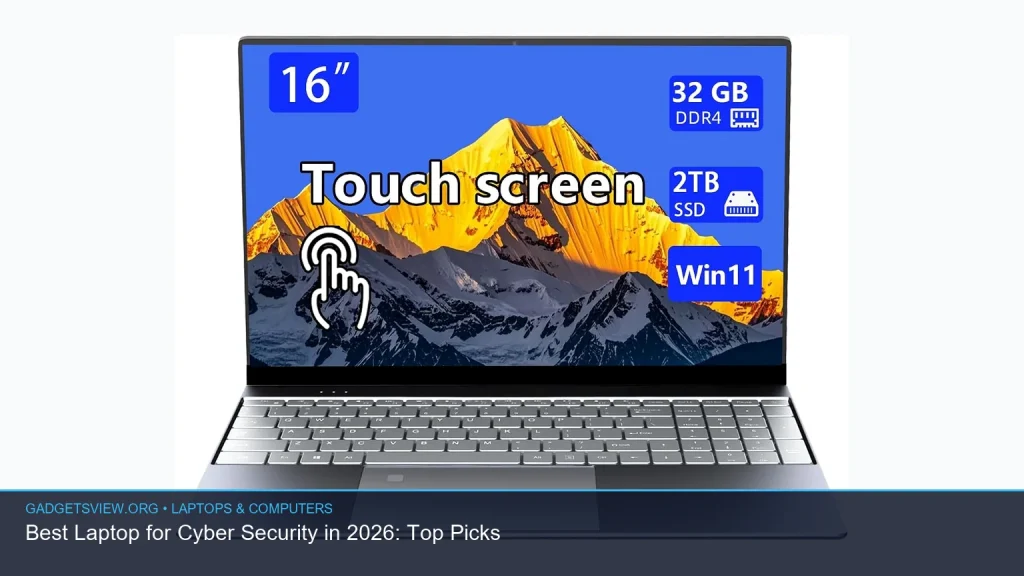
View current product details - 16-inch touchscreen portable laptop, with high-end all-metal body,32GB DDR4+2TB SSD, N95 quad-core 3.4GHz processor, fingerprint recognition and backlit keyboar
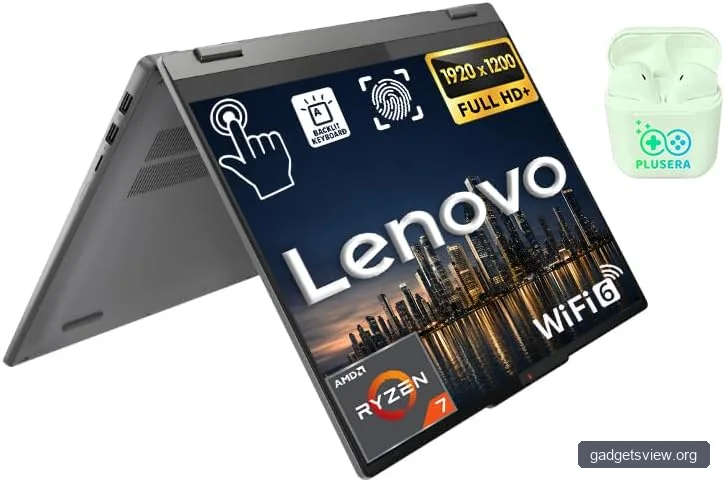
View current product details - Lenovo IdeaPad 2-in-1 Business Laptop, 16″ FHD+ Touch Display, AMD Ryzen 7 8845HS (>i7-1355U), 16GB DDR5 RAM 1TB SSD, Win 11 Pro, FP Reader, Backlit KB, Numeric
View current product details
Availability, specifications, and prices can change; verify them on the product page.
📌 Key Takeaways
- For serious cyber security work: prioritize 32GB RAM, a fast SSD, and a modern multi-core CPU so labs and virtual machines stay smooth.
- Windows 11 Pro helps: it is a smart choice for business users and security-minded buyers who want more control features than Home edition.
- Best balanced pick: the Lenovo IdeaPad 2-in-1 Business Laptop stands out for cyber security students and professionals who want performance, portability, and productivity features.
- Budget-friendly option: the Acer Aspire Go 15 AI Ready Laptop is better for light study, research, and basic tools than for heavy virtual lab use.
What matters most in the best laptop for cyber security
Cyber security work is different from normal schoolwork or office tasks. You may use browser sandboxes, multiple tabs, packet analysis tools, code editors, and one or more virtual machines at the same time. That means a thin laptop with weak hardware can slow you down fast.
Start with the CPU. A modern Ryzen 7 or Core 7-class chip is a safer pick than entry-level processors if you plan to run labs. Next, look for at least 16GB RAM, but 32GB is better if you want room for VMs, containers, and monitoring tools.
Selection criteria that matter most
- Processor: enough cores and speed for multitasking and lab work
- Memory: 16GB minimum, 32GB preferred
- Storage: SSD only, with 512GB as a practical floor
- Security features: Windows 11 Pro, fingerprint reader, and strong firmware support are useful
- Display and keyboard: good text clarity and a backlit keyboard help during long sessions
Battery life, port selection, and build quality also matter. Cyber security often means working on the move, plugging into different networks, and carrying the laptop to class, the office, or conferences.
Best laptop for cyber security: our top commercial picks
The models below are the strongest matches based on the listing details you provided. Since product listings can change, verify current specs before buying, especially storage, memory, and security features.
| Laptop | Best for | Why it stands out | Main limitation |
|---|---|---|---|
| Lenovo IdeaPad 2-in-1 Business Laptop | Students and pros who want a balanced security laptop | Ryzen 7 8845HS, 16GB DDR5, 1TB SSD, Win 11 Pro, fingerprint reader, backlit keyboard | 16GB RAM may feel tight for heavier VM use |
| Lenovo Laptop V15, Intel Core 7-240H | Heavier multitasking and larger local storage needs | 32GB DDR5, 1TB SSD, Windows 11 Pro | Productivity-focused design is less flexible than a 2-in-1 |
| Lenovo V15 Gen 4 | Business basics and budget-conscious buyers | Practical business form factor and Lenovo’s familiar mainstream lineup | Exact specs were not confirmed in the research list |
| Acer Aspire Go 15 AI Ready Laptop | Light cyber security learning and everyday use | Ryzen 7 7730U, 16GB RAM, 512GB PCIe Gen4 SSD, Wi‑Fi 6, FHD IPS display | Not ideal for multiple heavy virtual machines |
| 16-inch touchscreen portable laptop | Portability with lots of local storage | 32GB DDR4, 2TB SSD, fingerprint recognition, backlit keyboard | N95 processor is much weaker than Ryzen 7 or Core 7-class chips |
1) Lenovo IdeaPad 2-in-1 Business Laptop
This is the most balanced choice for many buyers who want the best laptop for cyber security without overpaying for features they may not use. The combination of a Ryzen 7 8845HS, 16GB DDR5 RAM, 1TB SSD, Windows 11 Pro, fingerprint reader, and backlit keyboard makes it strong for daily security work.
The 2-in-1 design is useful if you take notes, sketch diagrams, or use the laptop in tablet mode during classes and meetings. If your work is mostly labs, research, and productivity, this is a smart all-around pick.
2) Lenovo Laptop V15, Intel Core 7-240H, 32GB DDR5, 1TB SSD, Windows 11 Pro
If you want more headroom for multitasking, this is the stronger performance-first choice in the list. The 32GB DDR5 memory is especially helpful for running multiple tools or virtual machines at once.
This model is a good fit for users who know they will keep many apps open at the same time, such as a browser, terminal windows, packet tools, notes, and a lab environment. It is less flexible than a convertible, but it gives you a more work-focused setup.
3) Acer Aspire Go 15 AI Ready Laptop
This Acer is a sensible option for beginner cyber security students, general research, and lighter lab work. The Ryzen 7 7730U, 16GB DDR4, 512GB PCIe Gen4 SSD, and Wi‑Fi 6 make it a capable everyday machine.
It is a better match for learning and productivity than for heavy VM use. If you are starting out and need something affordable-looking on paper without jumping into advanced workloads, it may be enough.
4) Lenovo V15 Gen 4
The Lenovo V15 Gen 4 belongs on the shortlist because the V15 line is often aimed at practical business use. For cyber security buyers, that usually means simple design, workstation-like habits, and a focus on getting tasks done.
Because the research list did not confirm the exact CPU, RAM, or storage for this specific listing, treat it as a model family to verify carefully. It may be worth considering if current specs line up with your needs.
5) 16-inch touchscreen portable laptop with 32GB DDR4 and 2TB SSD
This one is a mixed bag. On paper, the 32GB RAM, 2TB SSD, fingerprint reader, and backlit keyboard look great for storage-heavy users. That much local space can help if you keep many VM images or offline files.
The concern is the N95 quad-core processor. For cyber security work, that chip is likely the weakest performance fit in this group, so it is better for light tasks than for serious lab use.
Who should choose what?
Different cyber security buyers need different tools. The best laptop for you depends on whether you are learning, testing, building labs, or doing real client work.
| Buyer type | Best fit | Why |
|---|---|---|
| Cyber security student | Lenovo IdeaPad 2-in-1 Business Laptop | Good balance of speed, storage, and flexibility for classes and labs |
| Power user with VMs | Lenovo Laptop V15, Intel Core 7-240H, 32GB DDR5, 1TB SSD | Best memory headroom in the confirmed list |
| Budget-minded beginner | Acer Aspire Go 15 AI Ready Laptop | Solid entry specs for learning and everyday use |
| Storage-heavy user | 16-inch touchscreen portable laptop with 2TB SSD | Large storage is useful, but only for lighter workloads |
Strengths and limitations of the top options
A good buying decision comes from knowing both sides. Cyber security users often need speed, but they also need a stable machine that can run long sessions without frustration.
Lenovo IdeaPad 2-in-1 Business Laptop
- Strengths: well-rounded specs, Windows 11 Pro, fingerprint reader, 1TB SSD, flexible form factor
- Limitations: 16GB RAM may be limiting for heavier multi-VM workflows
Lenovo Laptop V15, Intel Core 7-240H
- Strengths: 32GB DDR5 is excellent for multitasking and lab work
- Limitations: more traditional design and less versatility than a 2-in-1
Acer Aspire Go 15 AI Ready Laptop
- Strengths: practical specs for learning, research, and daily use
- Limitations: not the strongest choice for advanced cyber security workloads
16-inch touchscreen portable laptop
- Strengths: large storage and strong memory on paper
- Limitations: N95 CPU makes it a weaker fit for demanding security tasks
How to choose the right cyber security laptop in 2026
If you are still unsure, use this simple order of priorities. It keeps the decision practical and helps you avoid paying for the wrong thing.
- Pick your workload: light study, general productivity, or heavy VM use.
- Set your RAM target: 16GB minimum, 32GB if you expect to run labs often.
- Choose a strong CPU: Ryzen 7 or Core 7-class parts are safer bets than entry chips.
- Check storage: 1TB is better if you keep tools, ISOs, and VM images locally.
- Confirm security features: Windows 11 Pro, fingerprint reader, and reliable firmware support are pluses.
Also look at the keyboard and screen. Security work involves reading logs, editing text, and typing a lot, so a clear display and a comfortable keyboard matter more than flashy design.
FAQ
Do I need 32GB RAM for cyber security?
Not always. If you are only learning the basics, 16GB can work. If you plan to run virtual machines, Docker, or multiple tools at once, 32GB is the safer choice.
Is Windows 11 Pro better than Windows 11 Home for cyber security?
For many buyers, yes. Windows 11 Pro gives you more business-oriented controls, which can be useful if you want a more secure and flexible setup. Still, the right edition depends on your workflow.
Can I use a budget laptop for cyber security studies?
Yes, if your work is light. A budget laptop is fine for learning, web-based labs, note-taking, and entry-level tools. It may struggle with heavier virtual environments.
Is a 2-in-1 laptop good for cyber security?
It can be. A 2-in-1 is helpful if you take notes, present work, or switch between laptop and tablet modes. Just make sure the hardware is strong enough for your lab needs.
Should I choose more storage or more RAM first?
For most cyber security users, RAM matters first because it affects multitasking and virtual machines. Storage is next, but a fast SSD is important either way.
Conclusion
The best laptop for cyber security in 2026 depends on how deep you plan to go. For most buyers, the Lenovo IdeaPad 2-in-1 Business Laptop is the best balanced choice, while the Lenovo Laptop V15 with Core 7-240H and 32GB RAM is the stronger pick for heavier workloads.
If you are just starting out, the Acer Aspire Go 15 is a sensible entry point. Before you buy, verify the latest specs on the product page, compare RAM and storage carefully, and choose the model that best matches your lab needs and budget.