If you’re trying to figure out how to tell which AirPods I have, the fastest path is to check the model number, then match it to Apple’s list. You can usually find that number on the AirPods, on the charging case, or inside iPhone, iPad, or Mac settings. Once you have it, you can identify the exact generation in seconds. This guide walks you through the easiest ways to check, plus what to do if your AirPods are not charging, not connecting, or seem hard to identify.
📖 Table of Contents
- Start with the model number
- Use Apple settings to identify the exact AirPods version
- Identify AirPods by design clues
- Check battery, charging, and connection clues
- Use feature checks to narrow down the generation
- Common identification problems and what to do next
- What to choose when you are unsure
- FAQ
- Conclusion
📌 Key Takeaways
- The most reliable way to identify AirPods is by checking the model number, then matching it to Apple’s AirPods model list.
- You can often find the model number in iPhone or iPad Bluetooth settings, on the charging case, or on the AirPods themselves.
- If you’re unsure whether yours are genuine, charging, or connected correctly, simple checks in settings can help narrow it down fast.
- Once identified, you can better use features like noise cancellation, charging status, and Find My tracking.
Start with the model number
The quickest answer to how to tell which AirPods I have is to find the model number. Apple uses model numbers to separate each AirPods generation and version, and that is far more reliable than guessing based on shape alone. Different models can look similar, especially if you are comparing standard AirPods, AirPods Pro, and earlier generations.
After you find the number, compare it with Apple’s support documentation for AirPods models. That step matters because case styles, ear tip shapes, and feature sets can change over time. If you need to verify a purchase or confirm compatibility, the model number is the safest place to begin.
Where to find the model number on iPhone or iPad
- Open Settings.
- Tap Bluetooth.
- Find your AirPods in the list and tap the info button.
- Look for the Model Number.
This is usually the easiest method if the AirPods are already paired. If you see multiple numbers, that can be normal because the earbuds and the charging case may each have their own identifiers.
Where to find the model number on the case
You may also find the model number printed on the inside of the charging case lid or on the underside of the case, depending on the version. For MagSafe and wireless charging cases, the model information is often easier to spot when you open the lid and look closely near the hinge area. A bright light can help.
If the text is faded, the Settings method is usually faster and more readable. That is especially true for older cases with wear from daily use.
Use Apple settings to identify the exact AirPods version
Once you have the model number, you can match it to the exact product family. This is the part that tells you whether you have standard AirPods, AirPods Pro, or AirPods Max. It can also help you tell a first-generation model from a later one.
On an iPhone or iPad, the AirPods details page can also show useful clues like firmware version, serial number, and battery status. On a Mac, the AirPods may appear in Bluetooth or sound settings, which can help confirm whether the headset is connected correctly. If you are checking on a computer, the airpods on mac screen can be a good place to confirm the paired device name and connection status.
| What to check | What it tells you | Best for |
|---|---|---|
| Model number | Exact AirPods generation or version | Most reliable identification |
| Serial number | Individual unit info and support lookup | Warranty and support checks |
| Settings appearance | Quick visual clues like battery and features | Fast checks on iPhone, iPad, or Mac |
| Case design | General family type | Quick visual comparison |
When to use the serial number instead
A serial number is not the same as a model number. It identifies the specific unit, while the model number identifies the product type. If you need support, warranty help, or to check authenticity, a airpods pro serial number check may be more useful than a quick model lookup.
That said, for simply answering “which AirPods do I have?” the model number is the main key. Use the serial number as a backup or for support and ownership checks.
Identify AirPods by design clues
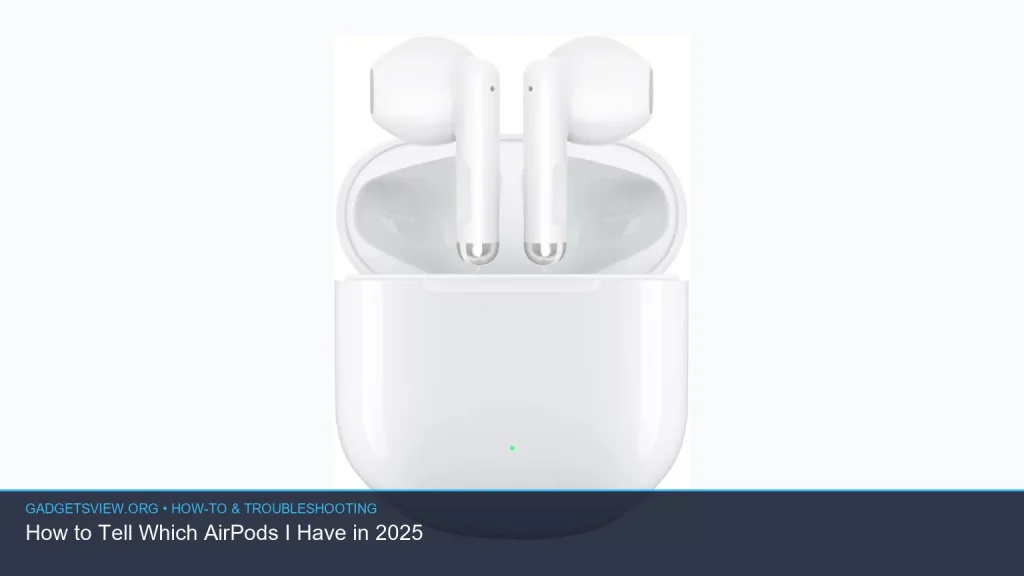
If you cannot access settings right away, you can still make a good estimate by looking at the hardware. AirPods models differ in stem length, ear tip design, case shape, and charging options. These clues are not always enough for a final answer, but they are very useful when the battery is dead or the earbuds are not paired.
Standard AirPods use an open-fit design without silicone tips. AirPods Pro use silicone tips and have a shorter stem. AirPods Max are full-size over-ear headphones, so they are easy to identify by shape alone. If you are comparing closely related versions, though, the differences can be subtle.
Quick visual checks that help
- No ear tips: usually standard AirPods.
- Silicone ear tips: usually AirPods Pro.
- Shorter stem and in-ear seal: often AirPods Pro.
- Large over-ear headband design: AirPods Max.
- Wireless charging or MagSafe case: may indicate a newer generation, but confirm with the model number.
These clues help narrow things down, but they are not foolproof. Cases can be swapped, and some features overlap across generations. That is why model verification still matters most.
Check battery, charging, and connection clues

If your AirPods are paired, battery and charging details can reveal whether they are connected correctly and whether the case is working as expected. This is especially helpful if you are trying to figure out whether the problem is the model, the case, or the charge level. It also gives you a better sense of the device you own.
If you are wondering how to know if AirPods are charging, open the case near your iPhone and look for the battery popup. A light on the case can also help, though light color and timing can differ by case type. If nothing shows up, clean the contacts, reseat the earbuds, and try a different charging cable or wireless charger if applicable.
Simple charging checks
- Place the AirPods in the case and close the lid.
- Connect the case to power if needed.
- Open the lid near your iPhone or check the battery widget.
- Look for a charging indicator or battery percentage change.
If the case is not responding, the issue may be dirt, a loose connection, or a drained battery. In that situation, charge the case for a while before checking again.
What if one AirPod is missing or lost?
If you are trying to how to track airpods, open the Find My app on your iPhone or use iCloud.com/find. You may be able to see the last known location, play a sound, or identify which earbud is nearby. Results can vary depending on battery life and whether the AirPods are in range of your devices.
Tracking is most useful when one earbud is missing, not when you are trying to confirm a model. Still, it can help you identify which version you own if the app shows available features tied to your device family.
Use feature checks to narrow down the generation
Some AirPods features can help confirm the generation once you already know the family type. For example, noise cancellation and transparency features are only available on certain models. That means a quick feature test can support your identification if the design alone is not enough.
If you want to know how to turn on noise cancellation on AirPods, connect your AirPods to an iPhone or iPad, then open Control Center and press and hold the volume control. Tap the noise control option you want, such as Noise Cancellation or Transparency, if your model supports it. If those controls do not appear, your model may not include that feature.
How to properly wear AirPods for the best fit
Fit matters because it affects sound, sealing, and feature performance. If you are learning how to properly wear AirPods, place the earbud so the stem points downward and the speaker sits comfortably in the ear canal or outer ear. For AirPods Pro, the silicone tip should create a gentle seal without pressure or pain.
If the fit feels loose or the audio seems uneven, try adjusting the angle slightly. For AirPods Pro, Apple’s ear tip fit test can help confirm the seal.
Common identification problems and what to do next
Sometimes AirPods are hard to identify because the case is empty, the earbuds are dead, or the pairing data is missing. In those cases, the best approach is to work backward from the simplest checks. Start with power, then connection, then model details.
It also helps to remember that a reset can temporarily remove helpful clues from your devices. If the AirPods were recently reset, reconnect them before checking model or feature details again.
| Problem | Likely cause | Best fix |
|---|---|---|
| No model info in Bluetooth | Not paired or Bluetooth issue | Reconnect AirPods or restart device |
| Case shows no charging light | Battery drained or charging fault | Charge with a known-good cable and clean contacts |
| Noise cancellation controls missing | Model may not support the feature | Check model number and Apple support page |
| Find My does not show location | Battery is dead or out of range | Check last known location and refresh later |
What to choose when you are unsure
If your goal is simply to identify the model, choose the model number method first. It is the most accurate and works best for resale checks, support requests, and compatibility questions. If the AirPods are paired, the iPhone or iPad settings route is usually the fastest.
If you cannot pair them, use the case design and earbuds as backup clues. For support or ownership verification, the serial number is the better choice. If you are still not sure, compare the model number against Apple’s official support page before making any assumptions.
| Method | Strengths | Limitations | Who should use it |
|---|---|---|---|
| Model number | Most accurate and direct | Requires lookup | Anyone who wants a sure answer |
| Serial number | Good for support and verification | Does not quickly tell the generation by itself | Buyers, sellers, support cases |
| Design clues | Useful when battery is dead | Can be misleading | Quick first look |
FAQ
How do I tell which AirPods I have if they are not connected?
Check the model number printed on the case or on the earbuds if visible. Then compare it to Apple’s official model list. If the text is hard to read, use a flashlight and inspect the inside of the lid and the case underside carefully.
Can I tell the difference between AirPods and AirPods Pro by shape alone?
Usually, yes. Standard AirPods do not use silicone tips, while AirPods Pro do. Still, shape alone is not always enough to identify the exact generation, so use the model number for confirmation.
What is the best way to check my AirPods Pro serial number?
The simplest method is through iPhone or iPad Bluetooth settings. Open the AirPods details page and look for the serial number. This airpods pro serial number check is helpful for warranty support, purchase verification, and service requests.
How do I know if my AirPods are charging in the case?
Open the case near your iPhone or check the battery widget. If the battery percentage changes or shows a charging icon, your AirPods are likely charging. If not, reseat them, clean the contacts, and confirm the case itself has power.
How do I make sure I am wearing AirPods correctly?
For standard AirPods, place them so they sit comfortably and stay secure without pushing. For AirPods Pro, insert the silicone tip gently and rotate slightly until the seal feels even. If audio sounds thin or they feel loose, adjust the fit or run the ear tip fit test if available.
Conclusion
The best way to answer how to tell which AirPods I have is to find the model number and match it to Apple’s official list. If the AirPods are paired, your iPhone, iPad, or Mac can show the details quickly. If not, use the case design, charging behavior, and feature checks as backup clues.
For the most accurate result, verify the model number first, then use the serial number only when you need support or ownership confirmation. If you are still unsure, compare what you see with Apple’s current support pages before buying, selling, or repairing your AirPods.