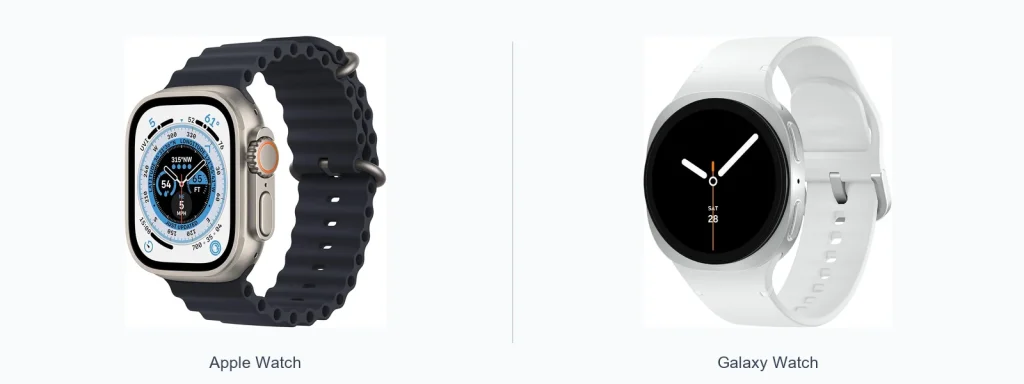
The question of “apple watch vs galaxy watch battery life” often decides which smartwatch people buy. There’s no single winner across every model. Battery life depends on model, settings, features used (GPS, LTE, always-on display), and software power management. This article compares how battery behavior typically differs between Apple Watch and Galaxy Watch lines, explains what affects runtime, and helps you pick the best option for your daily routine.
📖 Table of Contents
- How battery life is measured and why it’s tricky to compare
- Key factors that affect smartwatch battery life
- apple watch vs galaxy watch battery life: platform differences to understand
- Comparison table: what to check when comparing models
- Selection criteria: how to judge battery life for your needs
- Strengths and limitations — practical view
- Who should choose what: clear verdicts
- Practical tips to extend smartwatch battery life
- FAQ
📌 Key Takeaways
- Battery life varies more by specific model and settings than by brand alone.
- High-drain features—GPS, LTE, always-on display, and third‑party apps—reduce runtime quickly.
- Galaxy Watch models are often presented with multi-day battery claims; Apple Watch models emphasize daily charging and tight iPhone integration.
- Check manufacturer specs and recent third‑party tests for the model you plan to buy.
How battery life is measured and why it’s tricky to compare
Manufacturers give battery figures using controlled test scenarios. Those scenarios may not match how you use a watch. Tests might disable features like LTE or reduce screen brightness.
Independent reviews and real-world tests are useful. They show how a watch performs during workouts, with notifications, or on long trips. For a reliable decision, look at both official claims and independent testing for the exact models you’re considering.
Key factors that affect smartwatch battery life
Several technical and usage factors change battery runtime. Know these before you compare models.
- Display type and brightness: OLED and AMOLED screens look great, but a bright always-on display draws power.
- Connectivity: Cellular (LTE) and continuous Bluetooth keep radios active and use more energy.
- Sensors and features: GPS, continuous heart-rate monitoring, and advanced health tracking increase drain.
- Apps and notifications: Lots of background apps and frequent notifications can shorten battery life.
- Software optimizations: The operating system and power modes affect how efficiently a watch uses power.
apple watch vs galaxy watch battery life: platform differences to understand
Both Apple Watch and Galaxy Watch lines include devices aimed at different priorities. Platform and software choices influence how battery is managed.
Apple Watch runs watchOS and integrates tightly with iPhone. That integration can simplify syncing and notifications but may also shape how background tasks run. Galaxy Watch models have used different systems over time; many recent Galaxy watches run Wear OS with Samsung customizations, which affects app behavior and power features differently.
Comparison table: what to check when comparing models
| Comparison point | Apple Watch | Galaxy Watch |
|---|---|---|
| Official battery claims | Provided per model; compare manufacturer spec sheet and note test conditions | Provided per model; verify test scenarios and real‑world reviews |
| Power-management features | Includes low-power modes and optimized background tasks | Offers power saver modes and sometimes extended battery profiles |
| Impact of always-on display | Significant; disabling it extends life | Also significant; disabling or using restricted AOD settings helps |
| GPS / Workout impact | Continuous GPS + metrics drains battery quickly | Similar effect; duration depends on model and tracking method |
| App ecosystem | Tight iPhone integration—apps behave consistently | Wear OS/Samsung ecosystem—varies by app implementation |
Selection criteria: how to judge battery life for your needs
Use these criteria to pick a smartwatch that matches your daily routine.
- Daily charging tolerance: Do you prefer nightly charging, or do you want multiple days between charges?
- Feature priorities: If you use GPS, LTE, or continuous health monitoring a lot, expect higher drain.
- Display behavior: Always-on display gives convenience but shortens battery—decide if it’s essential.
- Phone ecosystem: If you use an iPhone, Apple Watch offers a seamless experience; Android users may favor Galaxy Watch models.
- Travel and workouts: Longer workouts or travel without chargers require models with stronger endurance or power-saving modes.
Strengths and limitations — practical view
Apple Watch — strengths
- Deep integration with iPhone and consistent app behavior.
- Effective low-power modes for essential features when battery runs low.
- User-friendly charging habits: many users accept nightly topping up for smoother performance.
Apple Watch — limitations
- Many models are designed with daily charging in mind; multi-day use without charging is less common.
- High-drain features like GPS and always-on displays noticeably reduce runtime.
Galaxy Watch — strengths
- Some Galaxy Watch models are aimed at providing longer between-charge use.
- Flexible power modes and settings can extend runtime in practical ways.
- Often appeals to users who want less frequent charging and more autonomy from a phone.
Galaxy Watch — limitations
- Battery behavior varies widely across models and software versions.
- App performance and background activity can affect real-world battery life.
Who should choose what: clear verdicts
Choose based on your ecosystem and charging preferences.
- Choose Apple Watch if: You use an iPhone and want the smoothest integration with apps and services, and you’re comfortable charging nightly in exchange for a refined experience.
- Choose Galaxy Watch if: You want longer time between charges and greater flexibility in power modes, especially if you use an Android phone or value multi‑day battery claims—verify the specific model’s performance first.
- Consider both if: You value health tracking and smart features but need to balance them with battery life—compare real-world tests for the exact models you’re considering.
Practical tips to extend smartwatch battery life
- Turn off always-on display or reduce brightness.
- Disable LTE or cellular when you don’t need it.
- Limit background apps and reduce notification frequency.
- Use built-in power-saving modes during long outings or travel.
- Charge at consistent times so the battery doesn’t run to empty frequently.
FAQ
- Q: Which brand has the longest battery life?
A: There’s no single brand-wide winner. Battery life varies by model, settings, and usage. Always check the specific model’s official claims and independent reviews.
- Q: Does turning off the always-on display make a big difference?
A: Yes. Disabling always-on display is one of the most effective ways to extend runtime on most smartwatches.
- Q: Will using LTE drain a watch faster than Bluetooth?
A: Yes. Cellular radios use more power than Bluetooth. Turn off LTE when you don’t need independent connectivity.
- Q: How do software updates affect battery life?
A: Updates can improve or worsen battery behavior depending on optimizations. Check recent user reports and update notes for battery-related changes.
Conclusion: There’s no universal answer to “apple watch vs galaxy watch battery life.” Your best choice depends on model, phone ecosystem, and how you use the watch. Next step: list the models you’re considering and compare their recent manufacturer specs plus independent runtime tests to match battery performance to your daily needs.