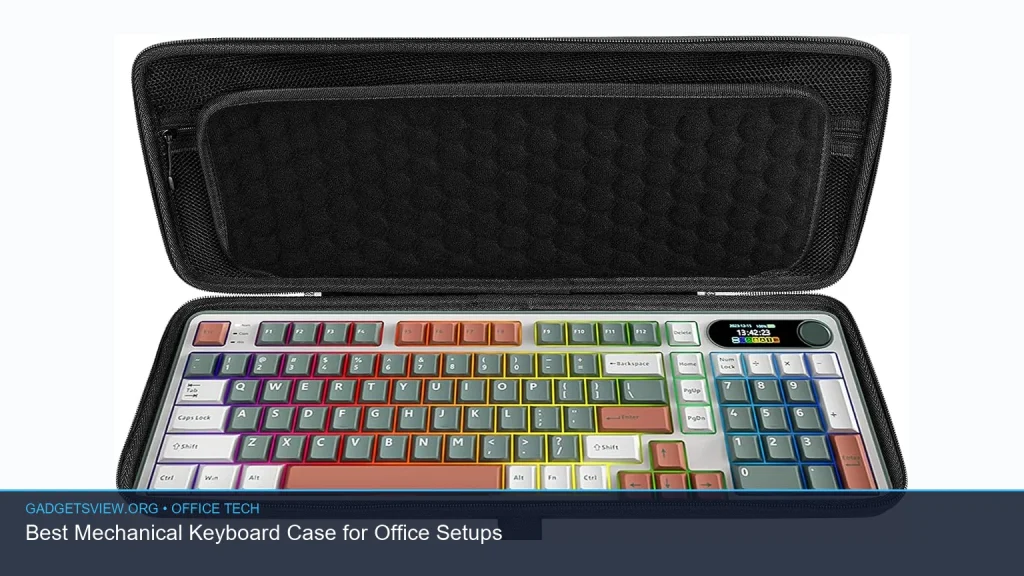
If you are building a cleaner, quieter office desk, the right mechanical keyboard case matters more than many buyers expect. It affects sound, feel, stability, and even how polished your setup looks on camera. The best choice for most office users is not the most flashy case, but the one that balances low noise, easy cleaning, solid build quality, and a professional look. This guide breaks down what to look for, which case materials make sense for work, and how to choose a case that fits your typing style, desk space, and budget.
📖 Table of Contents
- What Makes a Mechanical Keyboard Case Good for Office Use?
- Case Materials: Which One Fits an Office Setup?
- Mechanical Keyboard Case Types to Consider Before Buying
- How to Choose the Best Mechanical Keyboard Case for Your Workflow
- Features That Matter in Office Setups
- Strengths, Limitations, and Who Should Choose What
- FAQ
- Conclusion
📌 Key Takeaways
- A good mechanical keyboard case for office use should reduce noise, feel stable, and match a clean workspace.
- Aluminum, plastic, and low-profile cases each suit different needs, from premium feel to budget friendly mechanical keyboard builds.
- The best office choice often depends on typing sound, layout compatibility, and whether you need extra controls like a webcam button on keyboard setups.
- If you want a mechanical keyboard with cherry mx switches, make sure the case supports the right plate, mounting style, and layout before buying.
What Makes a Mechanical Keyboard Case Good for Office Use?
An office keyboard case should do more than hold switches in place. It should support long typing sessions, keep desk noise under control, and look professional in shared spaces. In many offices, that means avoiding rattly cases, overly bright styling, and layouts that take up too much room.
The best mechanical keyboard case for office setups usually has a firm build, clean lines, and a case design that helps soften the sharp sound many mechanical boards can make. If you work around others, that sound profile matters almost as much as switch choice. A quieter case can make a mechanical board feel much more office-friendly.
What to prioritize first
- Noise control: A solid case with good internal fit helps reduce ping and hollowness.
- Build quality: Less flex and wobble often means a more stable typing feel.
- Compatibility: The case must match your keyboard layout, mount type, and switch setup.
- Desk footprint: Smaller cases help preserve mouse space and keep work areas neat.
Case Materials: Which One Fits an Office Setup?

Material choice has a big effect on how a keyboard sounds and feels. It also affects weight, durability, and how premium the board looks on a desk. For office use, the goal is usually a case that feels refined without becoming distracting.
Aluminum cases are often chosen for their sturdy feel and clean look. Plastic cases can be a smart pick if you want a budget friendly mechanical keyboard build that stays light and practical. Wood, acrylic, and mixed-material cases may suit specific desk styles, but they are usually more about personal taste than office performance.
| Case Material | Best For | Strengths | Limitations |
|---|---|---|---|
| Aluminum | Premium office setups | Rigid, polished look, strong desk presence | Heavier, often less budget friendly |
| Plastic | Value-focused buyers | Light, affordable, easy to move | Can sound hollower if poorly designed |
| Acrylic | Style-forward desks | Unique look, often lighter than metal | Can show scratches more easily |
| Wood or wood-accented | Warm office decor | Soft visual tone, stands out without looking loud | Less common, compatibility varies |
Mechanical Keyboard Case Types to Consider Before Buying
Not every case fits every user. The right one depends on whether you value comfort, silence, portability, or a more premium workstation feel. If you already use a mechanical keyboard with cherry mx switches, the case should support the layout and mounting style that keeps those switches feeling consistent.
For office work, many buyers do best with compact layouts such as tenkeyless or 75% boards because they free up mouse space. Full-size boards still make sense if you enter data often or rely on a number pad. Just remember that a larger case takes more desk room and may draw more attention in shared spaces.
Common office-friendly case styles
- Compact case: Good for small desks and cleaner setups.
- Tenkeyless case: A balanced option for most office users.
- Low-profile case: Can feel faster and look sleeker on modern desks.
- Full-size case: Best for heavy spreadsheet work and number entry.
How to Choose the Best Mechanical Keyboard Case for Your Workflow

If you are shopping for the best mechanical keyboard case for office setups, use your daily tasks as the guide. A writer, analyst, designer, and manager may all want different things from the same category. The right case should fit how you work, not just how it looks in photos.
Start with layout, then sound, then appearance. This order helps narrow choices fast and keeps you from buying a case that looks good but feels wrong in use. It also helps if you are searching for a budget friendly mechanical keyboard setup, since the case can influence both cost and long-term satisfaction.
- Pick the layout first. Decide whether you need full-size, TKL, 75%, or a smaller board.
- Check switch and mount compatibility. If you want a mechanical keyboard with cherry mx switches, confirm the case supports the plate and PCB format you need.
- Think about sound. A denser case can reduce hollow noise, while a lighter case may need dampening to stay office-quiet.
- Match your workspace. Choose a case color and finish that blends with your desk and monitor setup.
- Review maintenance needs. Smooth finishes and simpler designs are often easier to dust and clean.
Simple decision guide
| Your Priority | Best Case Direction |
|---|---|
| Quiet typing | Densely built case with good dampening and a snug fit |
| Lower cost | Simple plastic case or value-focused kit |
| Premium look | Aluminum or metal-accented case |
| Small desk | Compact or tenkeyless layout |
Features That Matter in Office Setups
Small details can make a big difference in office use. A case with clean cable routing, strong stability, and a simple top profile can improve both comfort and appearance. That matters even more if you work in video meetings or sit near coworkers.
Some users also look for a webcam button on keyboard setups, or other quick-access controls that help with calls and remote work. While that is more about the full keyboard than the case alone, the case must still leave room for those controls and support the layout they need.
Look for these practical features
- Stable case fit: Less wobble and fewer unwanted sounds.
- Easy cleaning: Flat surfaces and simple edges collect less dust.
- Professional design: Neutral colors and low-key finishes suit offices best.
- Layout support: Extra keys or function rows should remain easy to reach.
Strengths, Limitations, and Who Should Choose What
Because no product list was provided, the best way to buy is by matching case type to user need. The right decision comes down to tradeoffs. A premium metal case may feel excellent, but it is not always the best value for someone building a budget friendly mechanical keyboard.
Use the guide below to decide what kind of office user you are. This will help you avoid paying for features that do not improve your workday.
| User Type | Best Choice | Why |
|---|---|---|
| Spreadsheet-heavy office user | Full-size or TKL case | Balancing number entry with desk space |
| Remote worker | Quiet, compact, clean-looking case | Better for calls and smaller workstations |
| Budget shopper | Plastic case with solid fit | Good value without unnecessary extras |
| Design-conscious user | Aluminum or wood-accented case | More refined desk presence |
FAQ
Is a mechanical keyboard case important for office noise?
Yes. The case can change how loud or hollow a keyboard sounds. A well-built case with a snug fit often sounds more controlled, which is useful in shared offices or during video calls.
What is the best mechanical keyboard case for a budget friendly mechanical keyboard?
A simple plastic case is often the best place to start. It can keep costs down while still offering good compatibility and a clean look, as long as the fit is solid and the layout works for your needs.
Can I use a mechanical keyboard with cherry mx switches in any case?
Not always. You need a case that matches the PCB, plate, and layout you are using. Before buying, verify that the case supports your exact board format and switch mount style.
Do I need a special case if I want a webcam button on keyboard controls?
Usually the control is part of the keyboard layout, not the case itself. Still, the case must support the board design that includes that button or shortcut area.
Which is better for offices: heavy metal or lightweight plastic?
It depends on your goal. Metal often feels more premium and stable, while plastic can be easier to move and more budget friendly. For most office users, the best choice is the one that balances sound, comfort, and practicality.
Conclusion
The best mechanical keyboard case for office setups is the one that fits your layout, keeps noise under control, and matches the way you work. If you want a premium desk feel, look at aluminum. If value matters most, a well-made plastic case may be the smarter buy. Start with layout, confirm compatibility, and choose the case style that supports your daily typing first.
Before you buy, check the board format, mounting style, and whether the design supports features you need now and later. That simple step can save money and make your office setup feel more intentional from day one.