
Expert Gaming Laptop Buying Guide 2026
May 12, 2026

Gaming laptops have evolved from niche devices into powerful, versatile machines that serve double duty for students. Whether you’re grinding through late-night study sessions or diving into the latest AAA titles, a gaming laptop can handle both academic workloads and entertainment with ease. But with so many options flooding the market in 2026, choosing the right one can feel overwhelming. That’s where this expert buying guide comes in.
This guide is designed specifically for students who need a balance of performance, portability, and value. You’ll learn how to evaluate key specs like GPU power, CPU performance, battery life, and build quality—without getting lost in technical jargon. We’ll also help you avoid common pitfalls, compare different categories of gaming laptops, and identify the best models based on your budget and needs. By the end, you’ll have a clear roadmap to make an informed decision that supports your academic success and gaming passion.
The gaming laptop market in 2026 is more competitive than ever. Brands like ASUS ROG, Lenovo Legion, MSI, Acer Predator, and Dell Alienware are pushing boundaries with thinner designs, better thermals, and longer battery life. Meanwhile, mid-range models now offer near-desktop-level performance at accessible prices. With advancements in AI-driven cooling, OLED displays, and next-gen RTX 50-series GPUs, there’s never been a better time to invest—if you know what to look for.

What to Look for When Buying Buying Guide
1. Budget & Price Range
Your budget is the foundation of your decision. As a student, you likely have financial constraints, so it’s essential to set a realistic spending limit before diving into specs. Gaming laptops range from under $800 to over $3,000, and knowing where your money will go—whether toward the GPU, display, or build quality—helps prioritize features.
Aim to allocate at least 60% of your budget to the graphics card and processor, as these directly impact gaming and multitasking performance. Avoid overspending on flashy RGB lighting or ultra-premium materials if raw power is your priority. Remember: a slightly older model with a strong GPU often outperforms a newer one with mid-tier components.
2. Performance Specifications
Performance is king when it comes to gaming laptops. The two most critical components are the CPU (processor) and GPU (graphics card). For 2026, look for at least an Intel Core i5-13500H or AMD Ryzen 5 7640HS for smooth multitasking during lectures and gaming. For serious gaming, an RTX 4060 or higher is recommended—this allows you to play modern titles at high settings with ray tracing enabled.
RAM is another key factor. 16GB is the sweet spot for most students; it handles gaming, streaming, and productivity apps without lag. Avoid 8GB unless you’re on a very tight budget—it’s already becoming outdated for modern games. Storage should be SSD-based, with a minimum of 512GB NVMe SSD. This ensures fast boot times, quick game loads, and ample space for assignments and media.
3. Build Quality & Durability
Students are constantly on the move—between dorms, libraries, and coffee shops—so durability matters. Look for laptops with reinforced hinges, aluminum or magnesium alloy chassis, and spill-resistant keyboards. Plastic builds may save money but often feel flimsy and wear out faster.
Keyboard quality is especially important. You’ll be typing essays and coding projects, so a comfortable, responsive keyboard with decent key travel (1.5mm or more) is a must. Backlit keys are helpful for late-night study sessions. Also consider thermal design: good airflow and multiple heat pipes prevent overheating during long gaming or rendering sessions.
4. Display Quality & Refresh Rate
The display is your window to both work and play. For gaming, a high refresh rate (144Hz or higher) makes motion smoother and gives you a competitive edge in fast-paced titles like Valorant or Apex Legends. Pair that with a fast response time (under 3ms) to reduce ghosting.
Resolution-wise, Full HD (1920×1080) is standard and ideal for most students—it balances clarity and performance. Some premium models offer QHD (2560×1440) or even 4K, but these demand more GPU power and drain battery faster. Color accuracy matters too: if you’re into photo editing or design work, aim for 100% sRGB coverage. OLED panels offer stunning contrast and vibrancy but can suffer from burn-in over time.
5. Battery Life & Portability
One of the biggest trade-offs with gaming laptops is battery life. High-performance components consume power quickly, so don’t expect all-day endurance. Most gaming laptops last 4–6 hours under mixed use (web browsing, document editing), but gaming can drain the battery in under 2 hours.
If you’re frequently between classes without access to outlets, consider models with larger batteries (80Wh or more) or power-saving modes. Weight and thickness also affect portability. Aim for under 5.5 pounds if you’ll be carrying it daily. Some ultrabook-style gaming laptops, like the ASUS ROG Zephyrus series, offer slim profiles without sacrificing too much performance.
6. Cooling System & Noise Levels
Gaming generates heat, and poor thermal management can throttle performance or damage components over time. Look for laptops with advanced cooling systems: dual or triple fans, vapor chambers, and multiple exhaust vents. Brands like MSI and Lenovo have made strides in quiet, efficient cooling.
Noise is another consideration. Some gaming laptops sound like jet engines under load, which can be distracting in quiet study environments. Check reviews for decibel levels—ideally under 45dB during gaming. Some models offer “silent mode” profiles that reduce fan speed at the cost of slight performance dips.
7. Connectivity & Ports
You’ll need a variety of ports for peripherals, external monitors, and data transfer. Essential ports include:
– USB-C (preferably with Thunderbolt 4 or USB4 for high-speed data and display output)
– USB-A (for older devices like mice and flash drives)
– HDMI 2.1 (for connecting to external displays or TVs)
– Ethernet (for stable online gaming)
– SD card reader (useful for photography or media students)
Wi-Fi 6E and Bluetooth 5.3 ensure fast, reliable wireless connections. Avoid laptops with only one USB-C port—you’ll end up needing a dongle for everything.
8. Brand Reputation & Ecosystem
Not all brands are created equal. Established names like ASUS, Lenovo, and MSI have proven track records for reliability and customer support. They also offer better software ecosystems—like ASUS Armoury Crate or Lenovo Vantage—for system monitoring and optimization.
Consider the brand’s update policy and driver support. Some manufacturers push regular firmware updates that improve performance and fix bugs, while others abandon older models quickly. Also, check if the brand has service centers near your campus—this can save time and money if repairs are needed.
Different Types of Buying Guide

Common Buying Mistakes to Avoid
❌ Mistake: Prioritizing RGB Lighting Over Performance
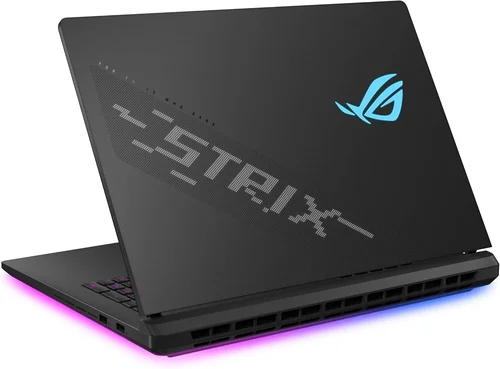
Why it’s bad: Flashy lights don’t improve frame rates or battery life. Many budget laptops use excessive RGB to mask weak internals.
What to do instead: Focus on GPU and CPU specs first. Save aesthetics for later—functionality matters more.
❌ Mistake: Ignoring Thermal Performance
Why it’s bad: Overheating causes throttling, reducing performance and shortening the laptop’s lifespan.
What to do instead: Read thermal reviews and look for laptops with vapor chambers or multiple heat pipes.
❌ Mistake: Buying Based on Brand Hype Alone
Why it’s bad: Some brands charge premium prices for minimal upgrades. A lesser-known model might offer better value.
What to do instead: Compare benchmarks and real-world tests across brands. Don’t assume “gaming brand” means best performance.
❌ Mistake: Overlooking Upgradeability
Why it’s bad: Many modern laptops solder RAM and storage, making future upgrades impossible.
What to do instead: Choose models with accessible RAM slots and extra M.2 SSD slots. This extends the laptop’s usable life.
❌ Mistake: Skipping Warranty and Support Research
Why it’s bad: Repairs can be costly, and some brands offer poor customer service.
What to do instead: Opt for at least a 1-year warranty with onsite or mail-in support. Consider extended coverage if available.
❌ Mistake: Assuming All “Gaming” Laptops Are Equal
Why it’s bad: Some laptops are marketed as gaming but use low-wattage GPUs that underperform.
What to do instead: Check the GPU’s TGP (Total Graphics Power). An RTX 4060 at 100W performs better than one at 60W.
❌ Mistake: Neglecting Real-World Battery Life
Why it’s bad: Manufacturer claims often reflect ideal conditions, not actual usage.
What to do instead: Look for independent battery tests under mixed-use scenarios (web, video, light gaming).
Budget Guidelines: How Much Should You Spend?
– Entry-Level ($700 – $1,000): Expect RTX 4050 or RX 7600S GPUs, 16GB RAM, and 512GB SSD. These handle esports titles (Fortnite, League of Legends) and light productivity well. Ideal for casual gamers on a tight budget.
– Mid-Range ($1,000 – $1,600): The sweet spot for most students. Look for RTX 4060 or 4070, Ryzen 7 or Core i7 CPUs, and 144Hz+ displays. These run AAA games at high settings and handle video editing or coding projects smoothly.
– Premium ($1,600 – $2,500): For enthusiasts and creators. Features include RTX 4070/4080, QHD displays, advanced cooling, and premium builds. Great for competitive gaming and demanding workloads.
– Luxury ($2,500+): Top-tier machines with RTX 4090, 4K OLED screens, and desktop-grade performance. Overkill for most students but ideal for those pursuing game development or 3D rendering.
Expert Tips for Getting the Best Deal
– Buy During Seasonal Sales: Major discounts happen during Amazon Prime Day, Black Friday, and back-to-school promotions. Sign up for price alerts using tools like Honey or CamelCamelCamel.
– Compare Refurbished Options: Certified refurbished laptops from manufacturers (e.g., Dell Outlet, ASUS Renewed) offer significant savings with full warranties.
– Check Student Discounts: Brands like Apple, Lenovo, and Microsoft offer education pricing. Even gaming brands occasionally run student promotions—always ask.
– Read Professional Reviews: Don’t rely solely on marketing specs. Sites like Notebookcheck, RTINGS, and our own Best Laptop 2026 Top Picks Tested Reviewed provide in-depth testing.
– Test Before You Buy: If possible, visit a store to check keyboard feel, screen quality, and fan noise. Online returns are easy, but hands-on testing prevents regrets.
– Consider Future-Proofing: Spend a little more now to avoid upgrading in two years. A better GPU or extra RAM slot can extend your laptop’s lifespan.
– Watch for Bundled Software: Some retailers include free antivirus, Office 365, or game bundles. These add value beyond hardware.

Frequently Asked Questions
Q: Can a gaming laptop replace a desktop for schoolwork?
A: Absolutely. Modern gaming laptops outperform many desktops in portability and versatility. They handle word processing, coding, video calls, and even light video editing with ease. Just ensure it has enough battery life for all-day use.
Q: Do I need a dedicated GPU for non-gaming tasks?
A: Not strictly, but a dedicated GPU helps with video rendering, AI tasks, and multitasking. Integrated graphics are fine for basic use, but a GTX or RTX card future-proofs your device.
Q: How important is screen size for students?
A: A 15.6-inch screen offers the best balance of usability and portability. 17-inch models are great for immersive gaming but harder to carry. 14-inch ultrabooks are portable but may feel cramped for multitasking.
Q: Will gaming damage my laptop’s battery?
A: Not if used properly. Avoid keeping it plugged in at 100% charge constantly. Use battery health modes (available in most brands) to cap charging at 80–90% for longevity.
Q: Can I upgrade my gaming laptop later?
A: It depends. RAM and SSD are often upgradeable, but GPUs and CPUs are usually soldered. Check the service manual before buying.
Q: Are gaming laptops good for programming?
A: Yes. The powerful CPUs and ample RAM make them excellent for coding, compiling, and running virtual machines. Just ensure the keyboard is comfortable for long typing sessions.
Q: Should I buy extended warranty?
A: For high-end models, yes—accidents happen. For budget laptops, it’s often not worth the cost. Consider accidental damage protection if you’re prone to drops or spills.
Q: How do I clean my gaming laptop?
A: Use compressed air for vents and a microfiber cloth for the screen. Avoid liquids near ports. Clean the keyboard gently with a soft brush.
Q: Can I use a gaming laptop for online classes?
A: Definitely. Most come with HD webcams and noise-canceling mics. Just ensure the microphone quality is good—some budget models have poor audio.
Q: Is ray tracing worth it for students?
A: Only if you play modern AAA games. Ray tracing enhances visuals but reduces frame rates. An RTX 4060 or higher handles it well at 1080p.
Our Final Recommendations
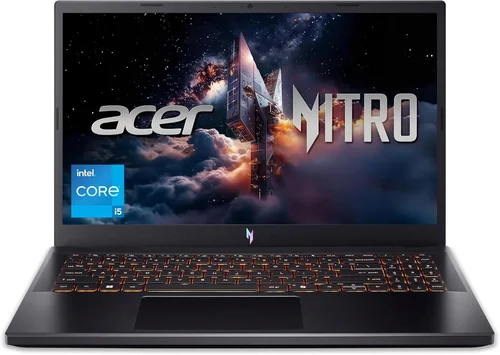
– Best for Budget-Conscious Buyers: Acer Nitro 5 (2026 model) – Offers RTX 4060, 16GB RAM, and 144Hz display under $1,000. Great for students who want solid performance without breaking the bank.
– Best Overall Value: Lenovo Legion 5 Pro – Combines Ryzen 7, RTX 4070, QHD 165Hz display, and excellent cooling under $1,500. Ideal for gaming and productivity.
– Best Premium Option: ASUS ROG Zephyrus G16 – Sleek, powerful, with RTX 4080, OLED display, and long battery life. Perfect for creators and competitive gamers.
– Best for Beginners: HP Victus 15 – Simple design, reliable performance, and easy upgrade path. Great first gaming laptop for new students.
– Best for Advanced Users: MSI Stealth 17 Studio – Packed with RTX 4090, 4K display, and desktop-level performance. For those who demand the absolute best.
Conclusion: Making the Right Choice
Choosing a gaming laptop as a student isn’t just about frame rates—it’s about finding a device that supports your academic journey and personal passions. By focusing on performance, build quality, battery life, and value, you can find a machine that lasts through four years of college and beyond.
Remember: the best laptop is the one that fits your lifestyle and budget. Don’t chase specs you won’t use. Prioritize what matters most—whether that’s portability for campus life, power for gaming, or durability for daily wear and tear.
Take your time, compare models, and use the tips in this guide to avoid costly mistakes. And if you’re also upgrading other tech, check out our Best Budget Smartphones in 2026 guide to complete your student tech ecosystem.
Your ideal gaming laptop is out there—armed with this knowledge, you’re ready to find it.