
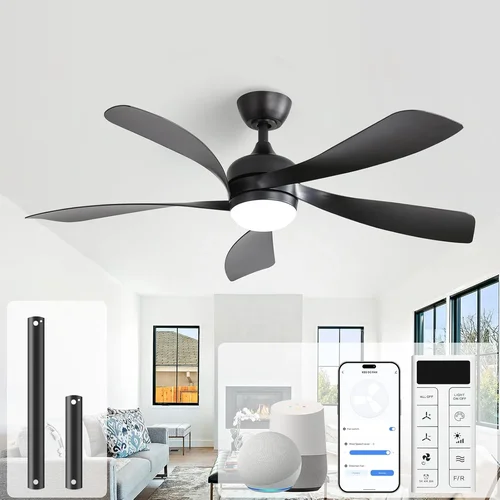
Complete Ceiling Fan Buying Guide 2026
May 18, 2026
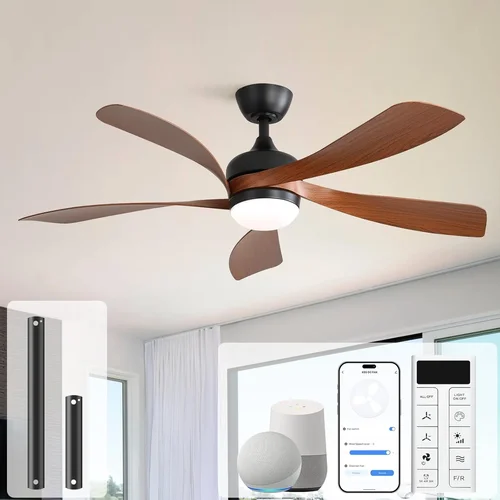
When it comes to home comfort and energy efficiency, few upgrades offer as much value as a well-chosen ceiling fan. Whether you’re looking to cool down during sweltering summer months, improve air circulation year-round, or simply elevate your room’s aesthetic, the right ceiling fan can make a world of difference. Yet despite their popularity, many homeowners still make costly mistakes when selecting one—mistakes that lead to poor performance, noisy operation, premature wear, or even safety hazards.
That’s why this comprehensive buying guide exists. We’re here to help you navigate the often-overwhelming world of ceiling fans with confidence. You’ll learn not just what to look for, but more importantly, what not to do. From sizing and motor quality to smart features and installation considerations, we’ll walk you through every critical decision point. By the end, you’ll have the knowledge to choose a fan that delivers optimal airflow, blends seamlessly with your décor, and lasts for years—without breaking the bank.
The ceiling fan market in 2026 is more diverse than ever. With advancements in DC motor technology, integrated LED lighting, smart home compatibility, and eco-friendly materials, today’s options go far beyond the basic white box fan of decades past. Brands now cater to every style preference—from rustic farmhouse designs to ultra-modern minimalist fixtures—and price points range from under $50 to well over $1,000. But with so many choices comes increased risk of confusion. This guide cuts through the noise, focusing on practical, expert-backed advice to ensure you avoid the most common pitfalls and invest wisely.

What to Look for When Buying Buying Guide
1. Room Size and Fan Diameter
One of the most fundamental—and frequently overlooked—factors is matching your fan size to your room dimensions. A fan that’s too small won’t move enough air to create a cooling breeze, while one that’s too large can overwhelm the space visually and physically. As a general rule:
- Rooms under 75 sq. ft. (e.g., small bathrooms): 29–36 inches
- Rooms 75–144 sq. ft. (e.g., bedrooms): 36–42 inches
- Rooms 144–225 sq. ft. (e.g., living rooms): 44–54 inches
- Rooms over 225 sq. ft.: 54 inches or larger, possibly dual-motor models
Also consider ceiling height. For standard 8-foot ceilings, a flush-mount or low-profile fan works best. For higher ceilings (9 feet or more), use a downrod to position the blades 8–9 feet above the floor—this ensures optimal airflow and safety.
2. Motor Type and Efficiency
The motor is the heart of your ceiling fan. In 2026, brushless DC (BLDC) motors dominate the high-efficiency segment. These motors consume up to 70% less energy than traditional AC motors, run quieter, and offer variable speed control. While they typically cost more upfront, the long-term energy savings often justify the investment—especially in hot climates where fans run daily.
Look for fans with ENERGY STAR certification, which guarantees superior efficiency and performance. Avoid ultra-cheap models with generic motors; they often lack torque, overheat quickly, and fail within a few years.
3. Blade Material and Pitch
Blade material affects both durability and airflow. Common options include:
- Plywood or MDF: Affordable but prone to warping in humid environments
- ABS Plastic: Lightweight, moisture-resistant, and great for coastal areas
- Solid Wood: Premium look and feel, but heavier and may require balancing
- Metal (aluminum or steel): Durable and modern, ideal for industrial styles
Equally important is blade pitch—the angle at which blades are set. A pitch between 12° and 15° is ideal for efficient airflow. Flat blades (under 10°) move less air and waste energy.
4. Lighting Integration
Many ceiling fans now include built-in LED lighting, eliminating the need for separate fixtures. When evaluating lighting options, consider:
- Lumens: Aim for at least 1,500 lumens for ambient lighting in medium-sized rooms
- Color Temperature: 2700K–3000K for warm, cozy light; 4000K+ for task-oriented spaces
- Dimmability: Ensure compatibility with existing dimmer switches or smart systems
- Replaceability: Some integrated LEDs are non-replaceable—check if the entire unit must be replaced when the light fails
If you prefer separate lighting, confirm the fan has a compatible light kit option (most mid-to-high-end models do).
5. Smart Features and Controls
Smart ceiling fans are no longer a luxury—they’re becoming standard. Look for Wi-Fi or Bluetooth connectivity that allows control via smartphone apps, voice assistants (Alexa, Google Assistant, Siri), or remote controls with scheduling and timer functions. Advanced models offer:
- Geofencing (auto-on when you arrive home)
- Sleep mode (gradually slows overnight)
- Integration with HVAC systems for coordinated climate control
However, avoid “smart” features that feel gimmicky. Focus on functionality that enhances convenience without complicating daily use.
6. Build Quality and Durability
A ceiling fan is a long-term investment. Check for solid construction: metal motor housings, reinforced blade brackets, and secure mounting hardware. Read reviews about wobbling—excessive vibration often indicates poor assembly or unbalanced blades. High-quality fans include balancing kits and detailed installation guides.
Also consider environmental factors. If installing outdoors or in a damp location (like a covered patio), choose a fan rated for damp or wet locations (look for UL Wet Location certification).
7. Aesthetic Compatibility
Your fan should complement your interior design, not clash with it. Consider finish (brushed nickel, matte black, oil-rubbed bronze), blade color, and overall silhouette. Modern homes may suit sleek, minimalist designs, while traditional spaces benefit from ornate details like scrollwork or distressed wood.
Don’t sacrifice function for form—but also don’t ignore style entirely. A mismatched fan can become an eyesore that’s hard to ignore daily.
8. Warranty and Customer Support
A strong warranty signals manufacturer confidence. Look for at least a 10-year motor warranty and 1–2 years on other components. Brands like Hunter, Casablanca, and Minka-Aire offer some of the best coverage. Avoid companies with vague return policies or no U.S.-based support.
Before purchasing, verify that replacement parts (especially remotes and light kits) are readily available.
Different Types of Buying Guide

Common Buying Mistakes to Avoid
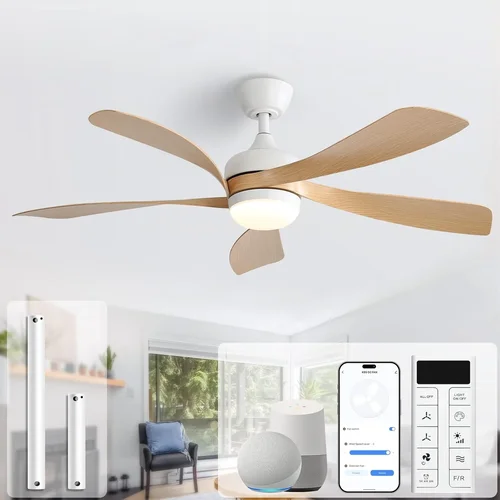
❌ Mistake: Ignoring Room Dimensions
Why it’s bad: A fan that’s too small creates weak airflow, making you feel no cooler—even on high speed. Conversely, an oversized fan can create uncomfortable wind tunnels and look visually unbalanced.
What to do instead: Measure your room’s square footage and ceiling height before shopping. Use manufacturer sizing charts and consider consulting a professional if you’re unsure.
❌ Mistake: Prioritizing Price Over Motor Quality
Why it’s bad: Cheap fans often use low-torque AC motors that struggle to start, overheat, and wear out quickly. You’ll end up replacing them in 2–3 years, negating any initial savings.
What to do instead: Invest in a brushless DC motor, even if it costs $50–$100 more. The energy savings, quieter operation, and longer lifespan make it worthwhile.
❌ Mistake: Overlooking Blade Pitch and Material
Why it’s bad: Flat blades (under 10° pitch) don’t move air efficiently, forcing the motor to work harder. Poor-quality materials like thin MDF warp in humidity, causing wobbling and noise.
What to do instead: Choose fans with 12°–15° blade pitch and durable materials suited to your climate. ABS plastic is excellent for coastal or high-humidity areas.
❌ Mistake: Skipping Smart Features Entirely (or Going Overboard)
Why it’s bad: Avoiding smart features means missing out on energy-saving automation and convenience. But buying a “smart” fan with buggy apps or limited compatibility leads to frustration.
What to do instead: Stick to reputable brands with reliable app ecosystems (like Bond or manufacturer-native apps). Test connectivity during the return window.
❌ Mistake: Neglecting Installation Requirements
Why it’s bad: Ceiling fans weigh 15–30 lbs and require proper electrical box support. Installing on a standard junction box can cause dangerous sagging or detachment.
What to do instead: Verify your ceiling has a fan-rated electrical box. If not, hire an electrician to install one. Never skip this step—even if the fan comes with “easy install” claims.
❌ Mistake: Choosing Based Solely on Looks
Why it’s bad: A stunning fan that doesn’t cool your room is just a decorative piece. Style matters, but function must come first.
What to do instead: Start with performance specs (CFM rating, motor type, size), then narrow down by aesthetics. Many stylish fans offer excellent performance—you don’t have to compromise.
Budget Guidelines: How Much Should You Spend?
- Entry-Level ($50–$120): Basic AC motor fans with limited features. Suitable for guest rooms or seasonal use. Expect shorter lifespans and higher noise levels. Brands: Hampton Bay, Harbor Breeze.
- Mid-Range ($120–$300): The sweet spot for most homeowners. Includes DC motors, better blade materials, and optional lighting. Great balance of performance, efficiency, and style. Brands: Hunter, Westinghouse, Honeywell.
- Premium ($300–$600): High-efficiency BLDC motors, smart controls, designer finishes, and superior build quality. Ideal for primary living spaces. Brands: Casablanca, Minka-Aire, Monte Carlo.
- Luxury ($600+): Custom designs, hand-carved blades, artisan finishes, and cutting-edge tech. Best for statement installations or luxury homes. Brands: Monte Carlo Luxury, Fanimation, Visual Comfort.
Expert Tips for Getting the Best Deal
- Buy off-season: Late fall and winter offer the best discounts as retailers clear summer inventory.
- Check manufacturer rebates: Some utilities offer rebates for ENERGY STAR ceiling fans—save $20–$50 instantly.
- Compare total cost of ownership: A $200 DC fan may cost less over 10 years than a $80 AC fan due to energy savings.
- Read verified buyer reviews: Focus on comments about noise, wobbling, and longevity—not just packaging or delivery.
- Test in-store when possible: Feel the weight, check remote responsiveness, and inspect blade alignment.
- Verify return policy: Ensure you can return if the fan doesn’t fit or perform as expected—some retailers charge restocking fees.
- Bundle with lighting: Some stores offer discounts when purchasing fans with compatible light kits.

Frequently Asked Questions
Q: How do I know if my ceiling can support a fan?
A: Only install a ceiling fan on a junction box rated for ceiling fans (marked “UL Listed for Fan Support”). Standard electrical boxes aren’t designed to handle the dynamic weight and vibration. If unsure, consult a licensed electrician.
Q: Can I install a ceiling fan myself?
A: Yes, if you’re comfortable with basic electrical work and have the right tools. However, improper wiring or mounting can be dangerous. When in doubt, hire a professional—it’s cheaper than repairing damage from a fallen fan.
Q: Do ceiling fans really save energy?
A: Absolutely. A quality ceiling fan uses about 30–100 watts, compared to 300–900 watts for an air conditioner. By allowing you to raise your thermostat 4–6°F, fans can reduce cooling costs by up to 40%.
Q: Should I run my fan in winter?
A: Yes! Reverse the blade direction (usually via a switch on the motor housing) to clockwise. This gently pushes warm air down from the ceiling, improving heat distribution without creating a draft.
Q: Why does my fan wobble?
A: Common causes include unbalanced blades, loose mounting hardware, or uneven blade alignment. Most quality fans include a balancing kit—use it to fine-tune stability.
Q: Are smart fans worth the extra cost?
A: If you already use smart home devices, yes. Features like scheduling, voice control, and integration with thermostats enhance convenience and efficiency. For occasional users, a simple remote may suffice.
Q: How long should a ceiling fan last?
A: With proper maintenance, a high-quality fan should last 10–15 years or more. Cheaper models may fail in 3–5 years due to motor burnout or bearing wear.
Q: Can I use a dimmer switch with a fan?
A: Only if the fan is specifically designed for dimming. Most fans require a dedicated fan speed control. Using a standard dimmer can damage the motor.
Our Final Recommendations
- Best for Budget-Conscious Buyers: Hunter Builder Deluxe – Reliable AC motor, classic design, excellent warranty, under $150.
- Best Overall Value: Westinghouse Comet – DC motor, 52-inch blade, includes remote, ENERGY STAR certified, around $200.
- Best Premium Option: Casablanca 54” Ainsworth – BLDC motor, whisper-quiet operation, customizable finishes, smart-ready, $450–$550.
- Best for Beginners: Hampton Bay Spring Creek – Easy installation, damp-rated, reversible blades, under $100.
- Best for Advanced Users: Minka-Aire F844-DK – Wi-Fi enabled, app-controlled, high CFM output, sleek modern design, $500+.
Conclusion: Making the Right Choice
Choosing the right ceiling fan isn’t just about picking something that looks good—it’s about enhancing comfort, saving energy, and investing in a fixture that will serve your home for years. By avoiding common mistakes like ignoring room size, skimping on motor quality, or overlooking installation needs, you set yourself up for long-term satisfaction.
Remember: the cheapest option isn’t always the best value, and the fanciest design won’t compensate for poor airflow. Prioritize your specific needs—whether that’s smart integration, outdoor durability, or whisper-quiet operation—and let those guide your decision.
Take your time, do your research, and don’t hesitate to ask questions. And when you’re ready to upgrade your home’s comfort, consider exploring our detailed Smartwatch Buying Guide 2026 What To Check Before You Buy for insights on another essential smart home device that complements modern living.
With the knowledge from this guide, you’re now equipped to make a smart, informed choice—one that keeps you cool, saves money, and adds lasting value to your home.