
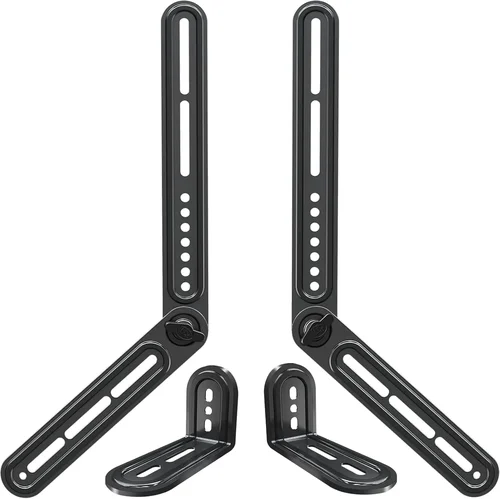
Universal Soundbar Bracket Buying Guide 2026
May 24, 2026

If you’ve invested in a high-quality soundbar to elevate your home theater experience, you already know that placement matters just as much as sound quality. A universal soundbar bracket isn’t just a mounting accessory—it’s a critical component that ensures optimal audio performance, clean aesthetics, and long-term safety. Whether you’re setting up a sleek OLED TV in a modern living room or upgrading a compact bedroom entertainment system, the right bracket can make all the difference. Yet, with dozens of options flooding the market—ranging from flimsy plastic clips to heavy-duty steel mounts—it’s easy to feel overwhelmed.
This comprehensive buying guide is designed to cut through the noise and help you make an informed decision in 2026. We’ll walk you through every essential factor to consider, from weight capacity and VESA compatibility to installation ease and build materials. You’ll learn how to avoid common pitfalls, understand what your budget really gets you, and discover expert-backed strategies for finding the best deals. Whether you’re a tech-savvy home theater enthusiast or a first-time soundbar buyer, this guide equips you with the knowledge to choose a bracket that enhances—not compromises—your setup.
The universal soundbar bracket market has evolved significantly over the past few years. Once limited to basic wall mounts or under-TV brackets, today’s models offer adjustable arms, tilt mechanisms, cable management systems, and even smart integration features. Brands like Sanus, Peerless, and Echogear now compete with budget-friendly alternatives from AmazonBasics and generic manufacturers. With so many choices, it’s more important than ever to know exactly what you’re looking for—and why.

What to Look for When Buying Buying Guide
1. Weight Capacity & Compatibility
The most critical factor when selecting a universal soundbar bracket is its ability to safely support your soundbar’s weight. Most modern soundbars range from 3 to 15 pounds, but premium models with subwoofers or rear speakers can exceed 20 pounds. Always check your soundbar’s manual for its exact weight and compare it against the bracket’s maximum load rating. A bracket rated for only 10 pounds will fail prematurely if used with a 12-pound soundbar—especially over time due to metal fatigue or vibration.
Beyond weight, ensure the bracket is truly “universal.” This means it should accommodate a wide range of soundbar lengths and mounting hole patterns (typically measured in millimeters). Look for adjustable arms or sliding rails that let you fine-tune positioning. Some brackets also include multiple mounting plate options or rubber spacers to fit irregular shapes or recessed inputs.
2. Mounting Type & Flexibility
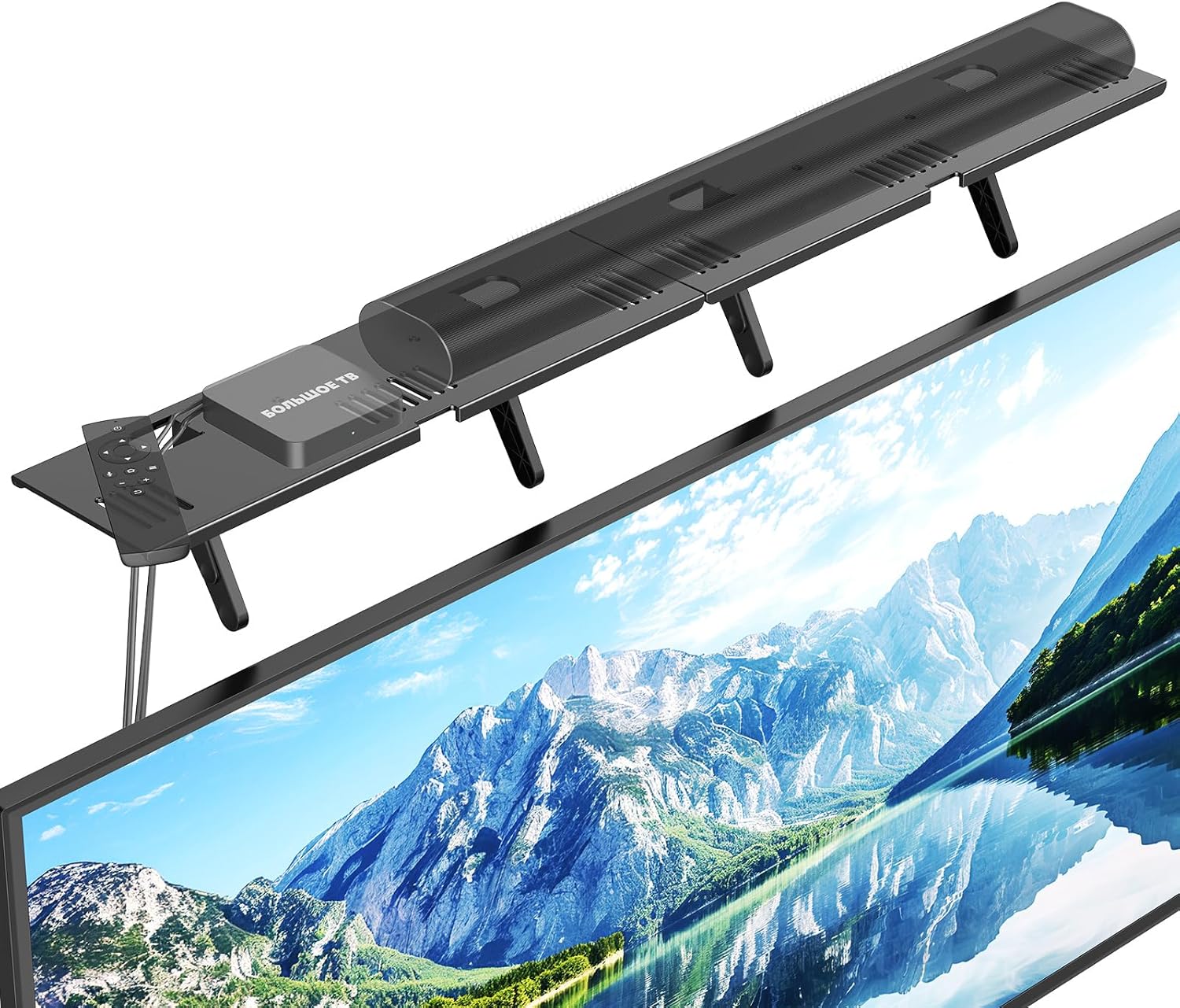
Universal brackets come in three primary mounting styles: wall-mounted, TV-mounted (under or above the screen), and freestanding/stand-mounted. Wall mounts offer the cleanest look and best acoustics by placing the soundbar flush with the wall, directly aligned with your TV. TV-mounted brackets attach to the back of your television using VESA holes (standardized screw patterns like 200×200 or 400×400), keeping everything in one plane. Freestanding options are rare but useful for renters or those without wall-mounting permissions.
Flexibility matters too. Can the bracket tilt up or down? Does it allow left-right sliding? These adjustments help align the soundbar precisely with your TV’s centerline and optimize sound projection toward your seating area. Avoid fixed-position brackets unless you’re certain of your ideal placement—future TV upgrades or room rearrangements could render them useless.
3. Build Quality & Durability
A bracket’s material directly impacts its longevity and stability. High-quality brackets use powder-coated steel or reinforced aluminum, which resist rust, bending, and warping. Cheaper models often rely on thin-gauge metal or plastic components that may crack under stress or sag over time. Look for welds at joints (not just screws) and anti-slip rubber pads that prevent scratching and reduce vibration transfer.
Durability also extends to finish quality. A poorly coated bracket may chip or corrode, especially in humid environments like basements or coastal homes. Opt for brackets with weather-resistant coatings if you plan to use them in non-climate-controlled spaces. Real-world testing shows that well-built brackets can last 10+ years without degradation, while budget options often fail within 2–3 years.
4. Ease of Installation
Even the best bracket is worthless if it’s too complicated to install. Look for models that include clear instructions, pre-assembled components, and all necessary hardware (screws, anchors, washers). Many top-tier brackets now feature tool-free adjustment knobs or quick-release mechanisms. Wall-mounted units should come with a built-in level or template stickers to ensure perfect alignment.
Consider your DIY skill level. If you’re not comfortable drilling into drywall or locating studs, choose a TV-mounted bracket—it leverages your TV’s existing VESA mount points and requires no additional wall penetration. For wall mounts, ensure the bracket supports both stud and drywall anchor installations. Some premium models even include a stud finder or offer professional installation services.
5. Cable Management
A clean setup isn’t just about looks—it reduces clutter that can interfere with sound dispersion and makes future upgrades easier. Quality universal brackets include integrated cable channels, Velcro straps, or snap-on covers to hide power cords and HDMI/optical cables. This is especially important for wall-mounted setups where exposed wires are unsightly and potentially hazardous.
Check whether the cable management system is accessible after installation. Some designs require disassembling part of the bracket to route cables, which becomes a hassle during troubleshooting. The best systems allow you to thread cables through before final tightening, then secure them with removable clips.
6. Brand Reputation & Warranty
Stick with reputable brands known for AV mounting solutions. Companies like Sanus (a subsidiary of Legrand), Peerless-AV, and Echogear have decades of experience and rigorous testing standards. They typically offer longer warranties (5–10 years) and responsive customer support. Generic or no-name brands may save you $10 upfront but often lack reliability and post-purchase assistance.
Warranty terms matter. A lifetime warranty on structural components is a strong indicator of confidence in product durability. Avoid brands that offer only 90-day or one-year coverage unless they’re extremely well-reviewed. Also, verify whether the warranty covers accidental damage or just manufacturing defects—some premium brackets include accidental drop protection.
7. Aesthetic Design & Finish
Your soundbar bracket should blend seamlessly into your entertainment setup, not draw attention away from it. Matte black finishes are the most popular because they minimize glare and match most TVs and soundbars. However, some brackets offer white, silver, or wood-grain options to complement specific décor styles.
Low-profile designs are ideal for minimalist setups. A bulky bracket can create visual imbalance, especially with ultra-thin TVs. Look for models with slim profiles (under 1.5 inches thick when mounted) and hidden hardware. Some high-end brackets even feature magnetic faceplates or paintable surfaces for custom matching.
8. User Reviews & Real-World Performance
Never rely solely on manufacturer specs. Read verified purchase reviews on Amazon, Best Buy, or specialty AV forums. Pay attention to comments about long-term stability, ease of adjustment, and compatibility quirks. For example, some brackets claim universal fit but don’t accommodate soundbars with rear-facing ports or unusually spaced mounting holes.
Look for patterns in feedback. If multiple users report sagging after six months, that’s a red flag—even if the product has a high average rating. Conversely, consistent praise for “rock-solid hold” or “tool-free tweaking” signals a reliable product. Video reviews on YouTube can also show installation in action and reveal hidden flaws.
Different Types of Buying Guide
Common Buying Mistakes to Avoid

❌ Mistake: Ignoring Soundbar Weight and Dimensions
Why it’s bad: Overloading a bracket causes sagging, instability, and potential damage to your soundbar or wall. Even if it holds initially, long-term stress can lead to failure.
What to do instead: Always verify your soundbar’s exact weight and mounting hole spacing. Choose a bracket with a 20–30% safety margin above your soundbar’s weight.
❌ Mistake: Assuming “Universal” Means Compatible with Everything
Why it’s bad: Many brackets claim universality but only fit standard sizes (e.g., up to 40 inches). Oversized or oddly shaped soundbars (like Sonos Arc or Samsung Q990C) often require specialized mounts.
What to do instead: Check the manufacturer’s compatibility list or contact support before buying. Measure your soundbar’s depth and width—not just length.
❌ Mistake: Skimping on Build Quality to Save Money
Why it’s bad: Cheap brackets use thin metal that bends under load, leading to misalignment and degraded sound quality due to vibration.
What to do instead: Invest in a mid-range bracket ($40–$70) from a trusted brand. The extra cost prevents replacement hassles and protects your audio investment.
❌ Mistake: Overlooking Cable Management
Why it’s bad: Exposed wires create visual clutter and can interfere with sound dispersion. They’re also tripping hazards and dust magnets.
What to do instead: Prioritize brackets with built-in cable channels or include Velcro straps. Plan your cable routing before final installation.
❌ Mistake: Not Checking VESA Compatibility for TV Mounts
Why it’s bad: If your TV doesn’t have standard VESA holes (or uses a non-standard pattern), a TV-mounted bracket won’t attach properly.
What to do instead: Confirm your TV’s VESA pattern (found in the manual or online specs). Most brackets support 75×75 to 600×400, but verify yours falls within range.
❌ Mistake: Installing Without a Level or Template
Why it’s bad: A crooked soundbar looks unprofessional and can affect audio imaging, especially with beamforming speakers.
What to do instead: Use a laser level or the bracket’s included template. Double-check alignment before tightening all screws.
❌ Mistake: Ignoring Future-Proofing
Why it’s bad: Buying a bracket that only fits your current soundbar limits upgrade options. You may need to buy a new mount when upgrading.
What to do instead: Choose an adjustable, wide-range bracket that accommodates larger soundbars. Look for modular designs that support add-ons.
Budget Guidelines: How Much Should You Spend?
Entry-Level ($15–$30): These brackets are best for lightweight soundbars (under 8 lbs) and temporary setups. Expect basic steel construction, minimal adjustability, and limited cable management. Brands like AmazonBasics or generic listings dominate this tier. While functional, they may lack durability and precise alignment features.
Mid-Range ($35–$70): This is the sweet spot for most buyers. You’ll find robust steel builds, full tilt/swivel adjustment, integrated cable management, and compatibility with 90% of soundbars. Models from Sanus, Echogear, and Peerless excel here. Expect 5–10 year lifespans with proper care.
Premium ($75–$120): Designed for enthusiasts and heavy soundbars (15+ lbs), these brackets offer precision engineering, anti-vibration dampening, and advanced mounting options (e.g., ceiling or corner installs). Look for powder-coated finishes, tool-free adjustments, and lifetime warranties. Ideal for Dolby Atmos setups where alignment is critical.
Luxury ($120+): Reserved for smart brackets or custom installations, this tier includes motorized positioning, app control, and designer finishes. While overkill for most users, they’re perfect for luxury home theaters or commercial AV setups requiring automation.
Expert Tips for Getting the Best Deal
- Shop during holiday sales: Black Friday, Prime Day, and post-holiday clearances often feature 20–40% discounts on AV accessories. Sign up for retailer newsletters to get early access.
- Buy directly from manufacturer websites: Sanus and Peerless often offer exclusive bundles (e.g., bracket + HDMI cable) or extended warranties not available elsewhere.
- Check refurbished or open-box deals: Retailers like Best Buy and B&H Photo sell certified refurbished brackets at 30–50% off with full warranties.
- Read the fine print on returns: Ensure the seller accepts returns if the bracket doesn’t fit. Some exclude “installed” items, so test fit before drilling.
- Bundle with other AV gear: Purchasing a soundbar and bracket together sometimes triggers automatic discounts or free shipping.
- Use price tracking tools: CamelCamelCamel (for Amazon) or Honey can alert you when prices drop on specific models.
- Consider professional installation: If you’re unsure about wall mounting, many retailers offer affordable installation services—often cheaper than replacing a damaged TV or wall.

Frequently Asked Questions
Q: Can I use a universal soundbar bracket with any TV?
A: Most TV-mounted brackets require standard VESA hole patterns (75x75mm to 600x400mm). Check your TV’s manual or measure the distance between mounting holes. Wall-mounted brackets are TV-agnostic but require sturdy wall support.
Q: Will mounting my soundbar affect sound quality?
A: Properly mounted soundbars often sound better because they’re aligned with the TV and unobstructed. Avoid placing them inside enclosed cabinets, which can muffle audio.
Q: Do I need special tools to install a soundbar bracket?
A: Basic tools (drill, screwdriver, level) are usually sufficient. Many modern brackets include all necessary hardware and tool-free adjustment knobs.
Q: Can I mount a soundbar above my TV?
A: Yes, but ensure it’s within 6–12 inches of the screen and angled slightly downward toward ear level. Some brackets offer upward tilt for this purpose.
Q: Are soundbar brackets safe for drywall?
A: Only if installed into wall studs or with heavy-duty drywall anchors (like toggle bolts). Never rely solely on plastic anchors for soundbars over 10 lbs.
Q: How do I hide wires with a wall-mounted bracket?
A: Use in-wall cable management kits (like Legrand’s OnQ) or surface-mounted raceways. Many brackets include built-in channels for basic concealment.
Q: Can I reuse a soundbar bracket when upgrading my soundbar?
A: If the new soundbar’s weight and mounting pattern fall within the bracket’s specs, yes. Adjustable models are most future-proof.
Q: Do soundbar brackets work with curved TVs?
A: Most TV-mounted brackets accommodate curved screens, but confirm compatibility. Wall mounts are generally safer since they don’t rely on the TV’s curvature.
Q: What’s the difference between a soundbar bracket and a soundbar mount?
A: The terms are often used interchangeably. “Bracket” typically refers to the physical hardware, while “mount” may imply a complete system including arms or shelves.
Q: How tight should I tighten the mounting screws?
A: Snug but not over-torqued. Over-tightening can strip threads or warp the bracket. Use a screwdriver—not a power drill—for final tightening.
Our Final Recommendations
Best for Budget-Conscious Buyers: Sanus SASB1 – At under $35, it supports up to 15 lbs, includes cable management, and offers tool-free tilt adjustment. Reliable and widely compatible.
Best Overall Value: Peerless-AV SP800 – Priced around $55, this steel bracket handles 25 lbs, fits most VESA patterns, and features a low-profile design with integrated level.
Best Premium Option: Sanus Advanced Soundbar Mount – At $90, it includes anti-vibration technology, precision alignment tools, and supports soundbars up to 30 lbs. Ideal for high-end setups.
Best for Beginners: Echogear ESB1 – Simple TV-mounted design with clear instructions and a 10-year warranty. Perfect for first-time installers.
Best for Advanced Users: Chief FUSION LCS1U – A motorized, app-controlled bracket ($180) that adjusts position based on content type. For smart home integrators and tech lovers.
Conclusion: Making the Right Choice
Choosing the right universal soundbar bracket isn’t just about mounting hardware—it’s about enhancing your entire audio-visual experience. From ensuring optimal sound projection to maintaining a clean, professional look, the bracket plays a quiet but crucial role. By prioritizing weight capacity, build quality, and flexibility, you protect your investment and future-proof your setup.
Remember, the cheapest option isn’t always the best value, and “universal” doesn’t mean one-size-fits-all. Take the time to measure your gear, read real user reviews, and consider your long-term needs. Whether you’re building a cozy bedroom theater or a living room showpiece, the right bracket will keep your soundbar secure, aligned, and performing at its best for years to come.
Ready to upgrade? Use this guide as your checklist, shop smart during sales seasons, and don’t hesitate to invest in quality. Your ears—and your TV—will thank you.