
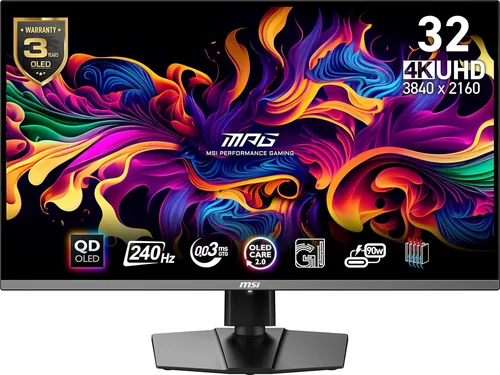
OLED Gaming Display Guide 2026
May 24, 2026
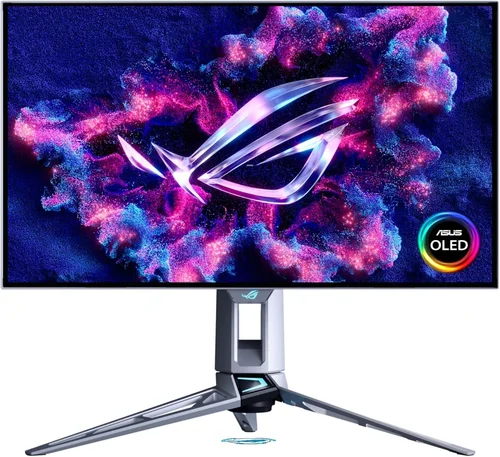
The world of gaming has evolved dramatically over the past decade, and one of the most transformative advancements has been the rise of OLED (Organic Light-Emitting Diode) display technology. Once reserved for high-end televisions and premium smartphones, OLED panels have now made their way into gaming monitors and TVs, offering a level of visual fidelity that traditional LCD and LED screens simply can’t match. For gamers who demand the most immersive, responsive, and visually stunning experience, OLED is no longer just a luxury—it’s becoming a necessity. Whether you’re diving into fast-paced competitive shooters, exploring vast open-world RPGs, or enjoying cinematic single-player adventures, the display you game on plays a critical role in how you experience every frame, shadow, and color.
This guide is designed for gamers of all levels—from casual players to hardcore enthusiasts—who want to understand whether OLED is truly worth the investment in 2026. We’ll break down the technology behind OLED, examine its performance in real-world gaming scenarios, and help you decide if it’s the right choice for your setup. You’ll learn how OLED compares to other display types like QLED, Mini-LED, and traditional IPS panels, what key specs to prioritize, and how to avoid common pitfalls when shopping. With the market flooded with options ranging from budget-friendly 27-inch monitors to ultra-premium 42-inch gaming TVs, making an informed decision has never been more important.
The OLED gaming display market in 2026 is more diverse and competitive than ever. Major brands like LG, ASUS, Samsung, and Sony are pushing the boundaries with innovations in refresh rates, response times, HDR performance, and burn-in mitigation. Meanwhile, new entrants are bringing down prices and expanding accessibility. Whether you’re building a PC battlestation or upgrading your console gaming experience, this comprehensive guide will equip you with the knowledge to choose the best OLED display for your needs—without overspending or falling for marketing hype.

What to Look for When Buying Buying Guide
1. Budget & Price Range
OLED displays remain among the more expensive options in the gaming monitor and TV market, but prices have dropped significantly since their initial release. As of 2026, entry-level OLED gaming monitors start around $600, while high-end models with advanced features like 240Hz refresh rates, HDMI 2.1, and built-in smart platforms can exceed $2,000. Your budget will heavily influence which features you can access, so it’s essential to set a realistic spending limit early. Consider not just the upfront cost but also long-term value—OLED’s superior image quality and longevity may justify the higher price for many users.
2. Performance Specifications
When evaluating an OLED gaming display, focus on core performance metrics: refresh rate, response time, input lag, and resolution. For competitive gaming, aim for at least a 120Hz refresh rate, though 144Hz or higher is ideal. OLED panels excel with near-instantaneous response times—often under 0.1ms—eliminating motion blur and ghosting. Input lag should be under 10ms for responsive gameplay. Resolution-wise, 1440p (QHD) is the sweet spot for most gamers, offering excellent detail without overburdening mid-range GPUs. 4K OLEDs are stunning but require powerful hardware to run smoothly at high frame rates.
3. Build Quality & Durability
OLED panels are thinner and lighter than traditional displays, but they require careful handling due to their organic materials. Look for models with robust frames, anti-glare coatings, and effective heat dissipation systems. Durability concerns often center around burn-in—a phenomenon where static images leave permanent marks. However, modern OLEDs include features like pixel refresh, screen shift, and automatic brightness limiting to mitigate this risk. Choose displays with strong warranties and proven track records for longevity.
4. Features & Functionality
Beyond raw performance, consider smart features and connectivity. HDMI 2.1 is essential for next-gen consoles and high-refresh 4K gaming. USB-C with DisplayPort Alt Mode and power delivery is a bonus for laptop gamers. Built-in smart platforms (like webOS or Android TV) add convenience but may not be necessary if you use external streaming devices. Additional perks include customizable RGB lighting, built-in speakers, and ergonomic stands with height, tilt, and swivel adjustments.
5. Brand Reputation
Stick with established brands known for quality and customer support. LG has been a pioneer in OLED technology and offers some of the most reliable gaming monitors and TVs. ASUS and Acer have strong gaming-focused lines with features tailored to esports and content creation. Samsung’s QD-OLED hybrids combine OLED contrast with quantum dot color for vibrant visuals. Research brand history, user feedback, and after-sales service before purchasing.
6. Warranty & Support
Given the premium nature of OLED displays, a solid warranty is crucial. Most manufacturers offer 1–3 years of coverage, but some include burn-in protection—a rare but valuable inclusion. Check if the warranty covers image retention, dead pixels, and panel defects. Extended warranty options and responsive customer support can save you headaches down the line, especially if you plan to use the display for 5+ years.
7. Size & Portability
OLED gaming displays come in sizes ranging from 24 inches to 48 inches. For desktop use, 27–32 inches is ideal for 1440p gaming, offering ample screen real estate without overwhelming your field of view. Larger 42–48 inch models double as TVs and are perfect for console gaming or immersive single-player experiences. Portability matters less for stationary setups, but if you plan to move your monitor frequently, consider weight and stand stability.
8. User Reviews & Ratings
Don’t rely solely on manufacturer specs. Read real user reviews on trusted platforms like Amazon, Newegg, and Reddit. Look for consistent feedback on image quality, reliability, and customer service. Pay attention to long-term reviews (6+ months) to assess durability and burn-in risk. Communities like r/buildapc and r/Monitors often provide honest, experience-based insights that specs alone can’t reveal.
Different Types of Buying Guide

Common Buying Mistakes to Avoid
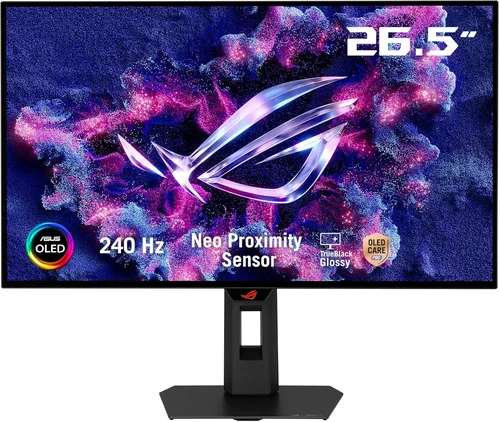
❌ Mistake: Ignoring Burn-In Risk
Why it’s bad: OLED pixels degrade over time, especially when displaying static elements like HUDs, logos, or taskbars for extended periods. Without proper mitigation, this can lead to permanent image retention.
What to do instead: Choose models with built-in anti-burn-in features like pixel orbiter, screen savers, and automatic brightness adjustment. Avoid leaving static content on screen for long durations.
❌ Mistake: Overpaying for 4K Without the Hardware
Why it’s bad: 4K OLEDs look stunning, but achieving high frame rates requires a top-tier GPU. Running 4K at 60Hz on a mid-range card defeats the purpose of a high-refresh OLED.
What to do instead: Match your resolution to your GPU’s capabilities. A 1440p OLED at 144Hz often delivers a better experience than a 4K panel struggling at 60Hz.
❌ Mistake: Skipping HDR Calibration
Why it’s bad: OLED excels in HDR, but poor calibration can lead to washed-out colors or crushed blacks, negating the technology’s advantages.
What to do instead: Use built-in calibration tools or invest in a colorimeter for professional-grade tuning. Enable HDR in both Windows and your game settings.
❌ Mistake: Choosing the Wrong Size for Your Setup
Why it’s bad: A 48-inch OLED might be too large for a desk setup, causing neck strain and reducing immersion due to excessive screen curvature or viewing distance.
What to do instead: Measure your desk space and viewing distance. For desks under 60 inches wide, stick to 27–32 inches. Larger screens are better suited for TV stands or wall mounts.
❌ Mistake: Neglecting Connectivity Options
Why it’s bad: Limited ports can restrict your ability to connect multiple devices or take advantage of high-bandwidth features like 4K 120Hz.
What to do instead: Ensure the display has HDMI 2.1, DisplayPort 1.4, and USB-C if needed. Check the number of ports to avoid constant swapping.
❌ Mistake: Buying Based on Brand Alone
Why it’s bad: Even top brands release underperforming models. Relying solely on reputation can lead to overpaying for mediocre performance.
What to do instead: Compare specific models using benchmarks, reviews, and side-by-side tests. Look beyond logos and focus on real-world performance.
Budget Guidelines: How Much Should You Spend?
– Entry-Level ($600 – $900): What to expect… These are typically 27-inch 1440p OLED monitors with 120–144Hz refresh rates. Ideal for budget-conscious gamers who want OLED quality without breaking the bank. Examples include the LG UltraGear 27GR95QE and ASUS ROG Strix XG27AQHO.
– Mid-Range ($900 – $1,500): Sweet spot for most buyers… This tier offers 144–240Hz refresh rates, better HDR performance, and improved build quality. Look for features like HDMI 2.1, USB-C, and advanced cooling. Great for both PC and console gaming.
– Premium ($1,500 – $2,500): For enthusiasts and professionals… These include 42–48 inch OLED TVs and high-end monitors with 4K resolution, 120Hz+, and professional-grade color accuracy. Perfect for immersive single-player games and content creation.
– Luxury ($2,500+): Top-tier features… Ultra-premium models with QD-OLED technology, 240Hz 4K, built-in calibration sensors, and extended burn-in protection. Reserved for serious gamers and professionals who demand the absolute best.
Expert Tips for Getting the Best Deal
– Buy during major sales events: OLED prices drop significantly during Black Friday, Cyber Monday, and Amazon Prime Day. Sign up for deal alerts from retailers like Best Buy, Newegg, and B&H.
– Compare online and in-store options: Online retailers often have better prices and return policies, but in-store demos let you test image quality and ergonomics firsthand.
– Check for open-box or refurbished units: Certified pre-owned OLEDs from reputable sellers can save you hundreds while offering near-new performance and warranty coverage.
– Read the fine print on warranties: Some brands offer extended burn-in protection only if you register the product within 30 days. Don’t miss the window.
– Test before you commit: If possible, visit a store to see the display in action. Pay attention to motion clarity, color accuracy, and viewing angles.
– Use price tracking tools: Websites like CamelCamelCamel and Honey can alert you when prices drop on your desired model.
– Consider trade-in programs: Some manufacturers offer credit for old monitors, reducing the effective cost of upgrading.

Frequently Asked Questions
Q: Is OLED safe for long gaming sessions?
A: Yes, with precautions. Modern OLEDs include features to reduce burn-in risk, such as pixel shifting and automatic brightness control. Avoid displaying static HUDs for hours without breaks, and enable screen savers when idle.
Q: Can OLED handle fast-paced games like CS2 or Fortnite?
A: Absolutely. OLED’s near-instant response time (0.1ms) and high refresh rates make it ideal for competitive gaming. Motion blur is virtually eliminated, giving you a clear edge in fast-moving scenarios.
Q: Do I need a powerful GPU for an OLED monitor?
A: It depends on the resolution and refresh rate. A 1440p 144Hz OLED runs well on mid-range GPUs like the RTX 4060 or RX 7600. For 4K 120Hz, you’ll need at least an RTX 4070 or better.
Q: Are OLED monitors good for streaming?
A: Yes. The vibrant colors and deep blacks enhance visual appeal for viewers. Pair it with a good webcam and microphone for a professional-looking stream.
Q: How long do OLED panels last?
A: Most OLEDs are rated for 30,000 to 100,000 hours of use. With normal gaming habits (4–6 hours daily), you can expect 5–10 years of reliable performance.
Q: Can I use an OLED monitor as a TV?
A: Yes, especially 42–48 inch models. Many include smart platforms, HDMI 2.1, and built-in speakers, making them perfect for console gaming and media consumption.
Q: Is QD-OLED better than standard OLED?
A: QD-OLED offers brighter highlights and wider color gamut, making it superior for HDR content. However, it’s more expensive and may have slightly higher burn-in risk. Choose based on your priorities.
Q: Do OLEDs have backlight bleeding?
A: No. OLED pixels emit their own light, so there’s no backlight to bleed. This eliminates issues like clouding and uneven brightness common in LCDs.
Q: Can I wall-mount an OLED gaming monitor?
A: Yes, most models support VESA mounts (100×100 or 200×200). Ensure the mount is rated for the display’s weight and size.
Our Final Recommendations
– Best for Budget-Conscious Buyers: LG UltraGear 27GR95QE – A 27-inch 1440p OLED with 144Hz refresh rate, excellent color accuracy, and strong anti-burn-in features at under $800.
– Best Overall Value: ASUS ROG Strix XG27AQHO – Offers 240Hz refresh rate, HDMI 2.1, and robust build quality for around $1,200. Ideal for competitive and casual gamers alike.
– Best Premium Option: LG C3 42-inch OLED TV – Combines 4K 120Hz gaming with smart TV features, perfect for console gamers and living room setups. Priced around $1,800.
– Best for Beginners: Acer Predator X27 – User-friendly interface, solid performance, and reliable support make it a great first OLED for new gamers.
– Best for Advanced Users: Samsung Odyssey OLED G8 – A 34-inch ultrawide QD-OLED with 175Hz refresh rate, HDR10+, and stunning color depth for immersive gaming and productivity.
Conclusion: Making the Right Choice
OLED technology has firmly established itself as a game-changer in the world of gaming displays. With unparalleled contrast, perfect blacks, and lightning-fast response times, OLED delivers a visual experience that’s simply unmatched by traditional LCDs. While concerns about burn-in and price persist, advancements in 2026 have made OLED more durable, accessible, and feature-rich than ever before.
When choosing an OLED gaming display, prioritize your specific needs: competitive gamers should focus on refresh rate and response time, while immersive single-player fans will appreciate HDR and screen size. Always balance performance with budget, and don’t overlook long-term factors like warranty and durability.
Ultimately, OLED isn’t just good for gaming—it’s redefining what gaming can look and feel like. Whether you’re upgrading your PC setup or transforming your living room into a gaming theater, an OLED display is a worthy investment that will elevate every frame. Take your time, do your research, and choose wisely. Your eyes—and your high scores—will thank you.
For more expert insights on tech upgrades, check out our guide on best budget smartphones in 2026 or explore our earphone FAQ for 2026 to complete your gaming setup.